
Lenovo ThinkPad Yoga 14 (2015 Edition) Business 2-in-1 Convertible
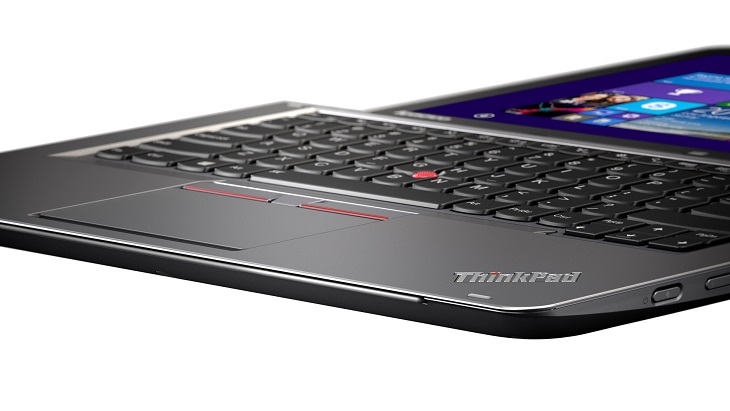
The Lenovo ThinkPad Yoga 14 was released in 2014. This is an overview of the 2015 version which brings the latest 5th Generation Intel Core Broadwell processor options instead of the 4th Gen Haswell. Generally, the ThinkPad Yoga 14 is a business convertible 2-in-1 laptop and tablet with a 14-inch Full HD IPS touch display and 360-degree rotating hinge. Besides the Broadwell CPUs, the convertible features up to 8GB of system memory and optional Nvidia GeForce 940M graphics. Storage is provided via an up to 256GB solid state drive and up to 1-Terabyte hard drive.
The chassis measures 0.8″ thin in profile. The device weighs in at 4.2 pounds, so this notebook is suitable for carrying around and taking on trips. The Chiclet-style backlit keyboard features “lift-and-lock” technology. It means the keyboard frame automatically rises and the keys lock when the device is in modes that don’t need the keyboard, such as the tablet and multimedia stand modes.
Lenovo says the battery life is up to 8 hours on this machine.
Optionally, the ThinkPad Yoga 14 comes with ActivePen for taking notes, drawing, and similar stuff.
Specifications
| Brand | Lenovo |
|---|---|
| Screen Size | 14-inch |
| Screen Resolution | 1920x1080 pixels Full HD |
| Touchscreen | Finger multi-touch input |
| Other Display Specs | IPS type |
| Processor (CPU) | Intel Core i5-5200U 5th Gen dual-core 2.2-2.7GHz 3MB cache (User Benchmark CPU score: 37) Intel Core i7-5500U 5th Gen dual-core 2.4-3.GHz 4MB cache (User Benchmark CPU score: 42) |
| Graphics (GPU) | Intel HD 5500 integrated graphics (good only for the lightest gaming) Nvidia GeForce GT 940M 2GB dedicated video card (User Benchmark GPU score: 10) |
| System Memory (RAM) Size | 4GB RAM 8GB RAM |
| Data Storage | 128GB SSD 256GB SSD 1000GB (1TB) HDD |
| DVD Optical Drive | None |
| Keyboard & Input | Backlit keyboard without dedicated number pad Touchpad with click buttons built into the surface Touchscreen |
| Speakers & Audio | Stereo speakers |
| Camera | Front-facing web camera |
| Wi-Fi Wireless | 802.11AC |
| Ethernet Network Port | No |
| Mobile broadband (4G LTE) | No |
| Bluetooth | Yes |
| USB Ports | 2 x USB 3.0 |
| Video Output Ports | 1 x HDMI |
| Media Card Reader | SD card reader |
| Battery | "up to 8 hours" battery life |
| Weight | 4.2 pounds |
| Height | 0.8" |
| Width | 13.2" |
| Depth | 9.1" |
| Windows Version | Windows 8.1 |
| Warranty | 1-year |
User Reviews, Questions and Answers
Below you can read and submit user reviews, questions, and answers about the Lenovo ThinkPad Yoga 14. Thank you for your contribution.
Please CLICK HERE to provide e-mail for receiving notifications when there are new replies
(The e-mail won't be used for any other purposes.)
More Related Laptops
-

Lenovo Yoga 7i 83DJ0003US 2-in-1 Laptop (14”, Intel Ultra 5, 16GB RAM, 1TB SSD)
969 USD* Read More -

HP Envy x360 16z-ad000 (2024) 16″ 2-in-1 Laptop
860 USD* Read More -

HP Envy x360 15t-fe100 (2024) 15.6″ 2-in-1 Laptop
999 USD* Read More -

HP Envy x360 2-in-1 Laptop (15.6″ FHD Touch, Intel i5-1335U, 8GB RAM, 512GB SSD, Silver) 15-ew1058wm 85S59UA#ABA
979 USD* Read More -
HP Envy x360 14-es1013dx 2-in-1 14″ Touch-Screen Laptop (Intel Core 5, 8GB RAM, 512GB SSD)
750 USD* Read More -

Lenovo IdeaPad Flex 5i 14 82R700L4US 2-in-1 Laptop (Intel i3-1215U, 8GB RAM, 256GB SSD)
550 USD* Read More -

HP Envy 16t-ac000 (2024) 16″ 2-in-1 Laptop
1,100 USD* Read More -

Asus Vivobook S 16 Flip TN3604YA-AS76 16″ 2-in-1 Convertible Laptop
700 USD* Read More -

HP Spectre x360 16-aa0023dx Premium-Class 16″ 2-in-1 Laptop
2,200 USD* Read More
5 out of 5
michael –
Overall an excellent laptop, no complaints, fast, reliable, great keyboard, extremely sturdy chassis (my is silver version). The only complaint I have is that the screen somehow attracts insane amount of dust. I have used tens of laptops in the past, but this is the worst in that regard and dust is very visible on the screen. Have to clean it everyday.
Notify me of replies Unwatch this thread
Naui –
You state the 2015 version is expected in May 2015 and has the 5th generation processor.
But such a Thinkpad Yoga 14 has already been released. See for example
http://comet.ee/en/notebooks-ultrabooks/30899-lenovo-thinkpad-yoga-14-s320dm003t-touch-14quot-fhd-multitouch-intel-core-i5-5200u-22ghz-3mb-8gb-ddr3-1600-256gb-ssd-intel-hd-gr-889233471814.html
Is this then already the 2015 version?
Also, the specs mention “Multi-Touch Trackpad with Integrated Buttons”. But as I understand and the picture on this page also shows is that in contrast to the 2014 version the laptop’s 2015 version has seperate buttons rather than integrated ones…
Notify me of replies Unwatch this thread
Danijel Z –
According to Lenovo, the 2015 ThinkPad Yoga 14 should arrive in May: http://news.lenovo.com/article_display.cfm?article_id=1876
The TP Yoga 14 on comet.ee has S3 in the model name, which is the same mark seen on the 2014 TP Yoga 14. On the other hand, the image on Comet and 5th Gen Core CPU indicate it’s a 2015 model, so it’s best to contact Comet and ask about it.
“Multi-Touch Trackpad with Integrated Buttons” is an entry in our database meaning that a trackpad itself has integrated instead of physical buttons. The buttons you see on images of the trackpad of the TP Yoga 14 2015 are actually buttons intended for use with the red TrackPoint navigation stick located on the keyboard. Buttons for the trackpad itself are built / integrated in the surface.