
HP 15-f111dx Laptop with Touchscreen, AMD A8 CPU, 8GB RAM, 750GB HDD
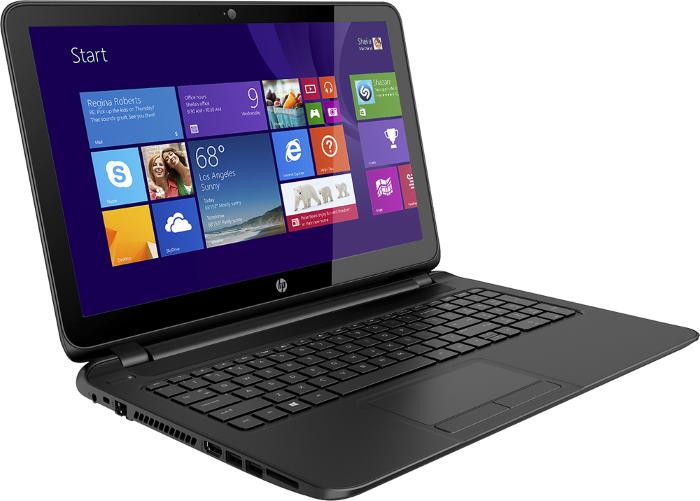
HP’s 15-f111dx is a lower-mid-range notebook PC with Windows 8.1 operating system. The 15.6-incher with touchscreen support is based on the AMD A8-6410 quad-core processor running at 2-2.4GHz depending on usage. It is suitable for the common daily home and office duties and is considered to be a mid-tier laptop processor. The CPU is accompanied with 8GB of main system memory, allowing a great headroom for multitasking with many apps running at the same time due to its large capacity. If you want to expand RAM further, it’s good to know HP has used a single 8GB module, while the laptop has two memory slots. Therefore, you can install another 4GB or 8GB module for a total of 12GB and 16GB, respectively. We also applaud HP for making RAM upgrade easy, since the machine has “service doors” on the bottom of the chassis for it. Data storage space of 750GB isn’t insanely large, but it is more capacious than the usual 500GB notebook HDDs. Unfortunately, the HDD isn’t user upgradeable. This model does have a built-in DVD optical drive.
The 1366-by-768-pixel display is powered by the AMD Radeon R5 series graphics integrated in the A8 CPU itself. It enables some low-end gaming, meaning you’ll be able to run decently non-demanding titles such as League of Legends or Minecraft and some heavier games on low settings and resolutions. As for video playback, the machine supports 1080p Full HD videos, which can be streamed to an HDTV or external monitor via the provided HDMI video connector.
The 15-f111dx is versatile when it comes to data input. Alongside the aforementioned touch display, the laptop provides a full-size keyboard, numeric pad, and multi-touch trackpad with physical buttons for left and right clicks.
It has a decidedly inconspicuous design, with matte-black plastics dominating the chassis. The case measures 1″ which is reasonably thin for a notebook from the budget mainstream category, but the weight of 5.7 pounds is among the heaviest in the same category.
For power autonomy, there’s a 3-cell lithium-ion polymer user-removable battery. Its capacity of 31WHr is a mediocre one, so you can’t expect a very long battery life with this notebook.
Other important features of the HP 15-f111dx are stereo speakers, a built-in webcam, three USB ports, Wi-Fi and Ethernet LAN Internet connections, and a media card reader. Bluetooth is missing.

Specifications
| Brand | HP |
|---|---|
| Screen Size | 15.6-inch |
| Screen Resolution | 1366x768 pixels HD |
| Touchscreen | Finger multi-touch input |
| Other Display Specs | TN type |
| Processor (CPU) | AMD A8-6410 quad-core 2-2.4GHz 2MB cache (User Benchmark CPU score: 24) |
| Graphics (GPU) | AMD Radeon R5 integrated graphics (only for lightest gaming) |
| System Memory (RAM) Size | 8GB RAM |
| Data Storage | 750GB HDD |
| DVD Optical Drive | DVD writer |
| Keyboard & Input | Non-backlit keyboard with dedicated number pad Touchpad with click buttons built into the surface Touchscreen |
| Speakers & Audio | Stereo speakers |
| Camera | Front-facing web camera |
| Wi-Fi Wireless | 802.11N |
| Ethernet Network Port | Yes |
| Mobile broadband (4G LTE) | No |
| Bluetooth | No |
| USB Ports | 2 x USB 3.0 + 1 x USB 2.0 |
| Video Output Ports | 1 x HDMI |
| Media Card Reader | SD card reader |
| Battery | 3-cell 31WHr 2.8Ah lithium-ion |
| Weight | 5.7 pounds |
| Height | 1" |
| Width | 15.1" |
| Depth | 10.2" |
| Windows Version | Windows 8.1 |
| Warranty | 1-year |
User Reviews, Questions and Answers
Below you can read and submit user reviews, questions, and answers about the HP 15-f111dx. Thank you for your contribution.
Please CLICK HERE to provide e-mail for receiving notifications when there are new replies
(The e-mail won't be used for any other purposes.)
More Related Laptops
-

Asus Vivobook Go L510MA-WS05 Affordable Laptop (15.6″ FHD, Intel Celeron N4020, 4GB RAM, 128GB eMMC, 1-yr Microsoft 365)
200 USD* Read More -

HP 15-fd0079wm / A2BZ8UA#ABA Affordable Laptop (15.6″, Intel Celeron N200, 4GB RAM, 128GB UFS, 12-mo. Microsoft 365)
259 USD* Read More -

Acer Aspire 3 A314-36P-3772 14″ Laptop (FHD, Intel Core i3-N305, 8GB RAM, 128GB SSD)
349 USD* Read More -

Asus Zenbook 14 OLED Q415MA-U5512 Laptop (14″ Touch, Intel Ultra 5, 8GB RAM, 512GB SSD)
800 USD* Read More -

HP Stream 14-cf2733wm / A2BZ1UA#ABA Affordable Laptop (14″, Intel Celeron N4120, 4GB RAM, 64GB eMMC, 12-mo Office 365)
129 USD* Read More -

HP Pavilion Plus 16-ab0010nr / 8B898UA#ABA Laptop (16″, Intel i7, 16GB RAM, 512GB SSD)
1,100 USD* Read More -

ASUS TUF A17 FA706NF-RS51 Gaming Laptop (17.3″ FHD 144Hz, AMD Ryzen 5 7535HS, Nvidia RTX 2050, 8GB RAM, 512GB SSD)
785 USD* Read More -

HP 15-fc0037wm / 7W6H6UA#ABA Laptop (15.6″, AMD Ryzen 5 7520U, 8GB RAM, 256GB SSD)
559 USD* Read More -

Lenovo IdeaPad 1 82QD00APUS Laptop (15.6″, Intel i5-1235U, 8GB RAM, 256GB SSD)
444 USD* Read More
3 out of 5
Sideeq –
What is your candid advice on changing the motherboard of this system from AMD to Intel… Would it work perfectly or not
Notify me of replies Unwatch this thread
Dan –
Hi, it is very uncommon to have an AMD motherboard (and processor) replaced with an Intel motherboard in a laptop. Unlike desktops, an AMD laptop’s chassis may be incompatible with Intel’s components and vice versa. But, I still advise you to ask HP directly.
Question
EDUARDO –
Can I use a universal digital pen on this laptop HP 15 f111dx using a program like activinspire where I use my finger to draw?
Notify me of replies Unwatch this thread
Dan –
Hi, I’m not sure what you mean by universal digital pen. The laptop doesn’t support active digitizer pens, like those you can find on the Microsoft Surface devices and other higher-end laptops. On laptop touchscreens without active digitizer pen support (like in this case), you can generally use simple “capacitive” pens, without pressure sensitivity and other advanced features of the active digitizer pens.
Jay –
I’ve never seen a laptop with non user upgradeable hdd. Are you sure that info is correct ?
Notify me of replies Unwatch this thread
Dan Z –
Hi, by “user upgradeable” I meant that there’s no easy access to the laptop’s HDD like it is to its RAM. RAM is under an easily removable plastic cover, which every regular user can remove and replace RAM. To access the HDD in this case you have to remove at least the whole bottom cover and maybe some other components (I would have to check the service manual to give you the answer for this particular laptop model). And also, in such setups HP usually states that for instance RAM is a “customer self-repair part”, while the HDD is an “authorized service provider-only part”. So, technically you can replace the HDD if you know how, but HP in their service manuals usually states that:
“Removal and replacement procedures for
Authorized Service Provider only parts, can damage the computer or void your warranty.”
LS Hopkins –
Multitouch touch screen does not always mean 10-point multitouch. Trying to determine how many points multitouch.
Notify me of replies Unwatch this thread
aggrey –
Hey, i tried to boot the laptop from a usb but it was not booting, what are the best bios settings?? thanks
Notify me of replies Unwatch this thread
Danijel Z –
If you’ve set boot priorities in BIOS properly – with USB as the first device, then maybe Secure Boot option in BIOS prevents boot up from USB. Secure Boot should be disabled. In addition, if you want to boot an old OS like Windows 7 from USB memory you should enable Legacy Support option in BIOS.