
HP 15-r018dx Cheap & Simple Laptop with Core i3
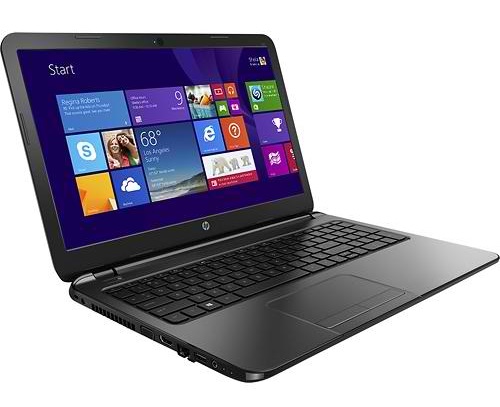
The HP 15-r018dx is yet another inexpensive laptop model. It packs usual stuff such as a 15.6-inch 1366×768-pixel display and 4GB of RAM, but adds some extra conveniences such as a large 750GB hard drive. Also, the processor isn’t from the bottom of the market. The included i3-4010U offers decent everyday performance and is a nice upgrade over the widely adopted Celeron and Pentium CPUs in the budget-class laptops. It’s not a speed demon like the quad-core i7 chip we see in gaming laptops, but it will serve for home and office duties absolutely fine. The 15-r018dx is outfitted with a DVD burner, stereo speakers, and webcam. None of the important ports and slots is missing. The laptop has three USBs. One of them runs at fast 3.0 speed standard. For external monitors, HDTVs, and projectors, there are HDMI and VGA video ports. A multiformat reader is there to read memory cards from your camera and other devices. For getting you online, the HP has Wi-Fi wireless and Ethernet LAN wired connectors. A missing perk is Bluetooth.
The battery inside is a 3-cell unit. Unfortunately, we can not tell how long the battery life lasts since we have no info on that.
HP’s 15-r018dx has different design than the other HP consumer laptops. It’s probably one of the first model with the chassis as shown on the image above. Glossy surfaces got replaced with matte finish. Overall, the laptop has a clean design, without excess gimmicks. The keyboard has isle style keys, while the trackpad sports real click buttons instead of integrated in the surface. quite thin for a 15.6″ laptop. It measures 1″. The weight of 4.9 pounds is below average, too. It’s about 10 percent lighter.

This notebook is recommended for anyone looking for something simple and cheap. You won’t find touschscreen support on it nor dedicated graphics for gaming, but it can accomplish all your web, office, and multimedia tasks with ease and has a spacious hard drive as a strong point. If you want to experience touchscreen input on a similar laptop but don’t want to shell out too much cash, you can check out Toshiba’s C55T-B51009. It has almost identical specs with the 15-r018dx.
Specifications
| Brand | HP |
|---|---|
| Screen Size | 15.6-inch |
| Screen Resolution | 1366x768 pixels HD |
| Touchscreen | No touchscreen |
| Other Display Specs | TN type |
| Processor (CPU) | Intel Core i3-4010U 4th Gen dual-core 1.7GHz 3MB cache (User Benchmark CPU score: 25) |
| Graphics (GPU) | Intel HD 4400 integrated graphics |
| System Memory (RAM) Size | 4GB RAM |
| Data Storage | 750GB HDD |
| DVD Optical Drive | DVD writer |
| Keyboard & Input | Non-backlit keyboard with dedicated number pad Touchpad with separate physical click buttons |
| Speakers & Audio | Stereo speakers |
| Camera | Front-facing web camera |
| Wi-Fi Wireless | 802.11N |
| Ethernet Network Port | Yes |
| Mobile broadband (4G LTE) | No |
| Bluetooth | No |
| USB Ports | 2 x USB 2.0 + 1 x USB 3.0 |
| Video Output Ports | 1 x HDMI + 1 x VGA |
| Media Card Reader | SD card reader |
| Battery | 3-cell lithium-ion polymer battery (2800 mAh) |
| Weight | 4.9 pounds |
| Height | 1" |
| Width | 14.9" |
| Depth | 10.2" |
| Windows Version | Windows 8.1 |
| Warranty | 1-year |
User Reviews, Questions and Answers
Below you can read and submit user reviews, questions, and answers about the HP 15-r018dx. Thank you for your contribution.
Please CLICK HERE to provide e-mail for receiving notifications when there are new replies
(The e-mail won't be used for any other purposes.)
More Related Laptops
-

Asus Vivobook Go L510MA-WS05 Affordable Laptop (15.6″ FHD, Intel Celeron N4020, 4GB RAM, 128GB eMMC, 1-yr Microsoft 365)
200 USD* Read More -

HP 15-fd0079wm / A2BZ8UA#ABA Affordable Laptop (15.6″, Intel Celeron N200, 4GB RAM, 128GB UFS, 12-mo. Microsoft 365)
259 USD* Read More -

Acer Aspire 3 A314-36P-3772 14″ Laptop (FHD, Intel Core i3-N305, 8GB RAM, 128GB SSD)
349 USD* Read More -

Asus Zenbook 14 OLED Q415MA-U5512 Laptop (14″ Touch, Intel Ultra 5, 8GB RAM, 512GB SSD)
800 USD* Read More -

HP Stream 14-cf2733wm / A2BZ1UA#ABA Affordable Laptop (14″, Intel Celeron N4120, 4GB RAM, 64GB eMMC, 12-mo Office 365)
129 USD* Read More -

HP Pavilion Plus 16-ab0010nr / 8B898UA#ABA Laptop (16″, Intel i7, 16GB RAM, 512GB SSD)
1,100 USD* Read More -

ASUS TUF A17 FA706NF-RS51 Gaming Laptop (17.3″ FHD 144Hz, AMD Ryzen 5 7535HS, Nvidia RTX 2050, 8GB RAM, 512GB SSD)
785 USD* Read More -

HP 15-fc0037wm / 7W6H6UA#ABA Laptop (15.6″, AMD Ryzen 5 7520U, 8GB RAM, 256GB SSD)
559 USD* Read More -

Lenovo IdeaPad 1 82QD00APUS Laptop (15.6″, Intel i5-1235U, 8GB RAM, 256GB SSD)
444 USD* Read More
1 out of 5
Chrissy –
I’ve had this laptop for a week and several times a day, the touchpad stops working. It goes from fine to barely moving, all for no reason. For days I readjusted the touchpad settings over and over again; for some reason they were resetting all the time. For the last two days, the settings have not changed on their own but the pad stops working anyway. Then, it will start working again about 30 min. later. Of course I’m not turning off the pad accidentally. In fact, I have that setting disabled. There is no reason at all. Worst part is that we have two other versions of this laptop and the touchpads are just as bad. My old HP laptop, which is huge and was perfect for years, is dying and I have this new, horrible thing. My husband’s HP laptop, another similar version, is just fine. I have readjusted the settings repeatedly, matched my husband’s laptop’s settings, gone online many times, and still this pad does not work correctly . In fact, the pad just stopped working right now while I’m typing this. I have an external mouse and that’s the only reason I haven’t thrown this thing out the window yet. Ok, after I typed that last sentence, the touchpad started working again. It has a mind of its own and I will be returning this piece of junk as soon as possible. If the touchpad does not work, the laptop is entirely useless.
Notify me of replies Unwatch this thread
1 out of 5
Keith Nguyen –
Yeah it happened to me as well the touch pad is honestly terrible that’s why it’s better to use a mouse like this touch pad is kind of useless even my cursor disappears