
HP Pavilion 17-f004dx 17.3″ Laptop with AMD A10 CPU & 750GB HDD
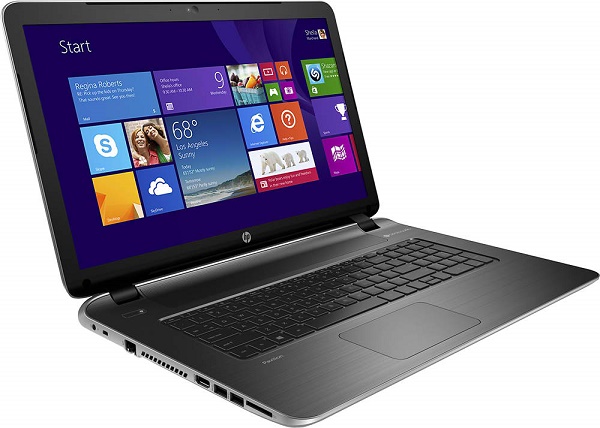
The HP Pavilion 17-f004dx is a 17.3-inch notebook. It is based on the AMD A10-5745M processor and comes with 6GB of system memory and a 750GB hard drive instead of usual 4GB RAM and 500GB HDD. The A10-5745M with four cores and the Radeon HD 8610G integrated graphics is a rare CPU. Its performance is similar to the more popular dual-core Intel Core i3-4030U with the Intel HD 4400 IGP, meaning sufficient performance for day-to-day tasks and gaming on lower graphics settings.
The 17-f004dx belongs to the desktop PC replacement segment. Its weight of 6.2 pounds isn’t suitable for carrying the device around much, but on the other side you get a plenty of screen real estate. The screen resolution is higher than on the majority of 15.6-inch and smaller laptops. It’s 1600×900 pixels instead of 1366×768. This means more comfortable movie watching and work with big files like high-resolution images or Excel documents with lots of columns.
Other highlights of this model are the built-in DVD optical drive, keyboard with a dedicated numeric pad, touchpad with left and right click buttons integrated in the surface, stereo speakers, 720p web camera, Wi-Fi and Ethernet LAN network connections, and a nice selection of ports and slots. Provided are three USBs, HDMI video output, and a media card reader. Omitted are the VGA video output port and Bluetooth.
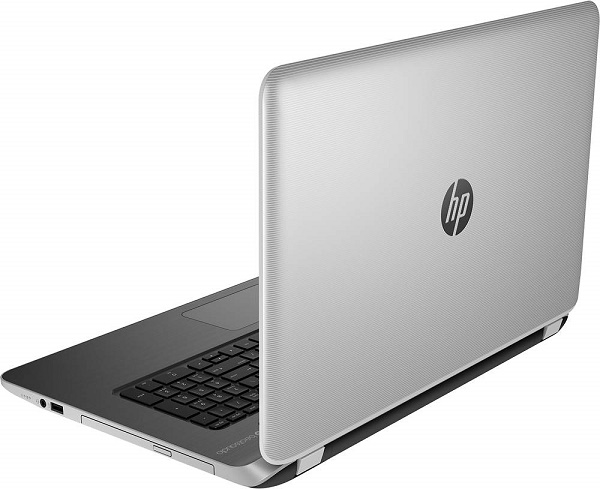
The chassis is made of plastics, but the Pavilion 17-f004dx has a bit of a luxury look. That’s thanks to an elegant shape with no excess ornaments, brushed metal-like finish on the palmrest, textured silverish display lid, and a fairly slim profile for a laptop of this size. It measures 1.1″ high. As a side note, the 17-f004dx is the first Pavilion 17 model sporting the new 2014 design. The previous version has glossy plastics on the palm rests and is 0.2″ thicker.
We have no info on battery life. But given that it has a 41Whr battery unit inside, the AMD A10 CPU, and a big screen, one can expect a run time of about four hours at best.
Overall, this fairly priced model delivers good performance and lots of screen real estate in an elegant-looking package. Sure, it doesn’t have 1920×1080 Full HD display resolution, a top performing quad-core Intel i7 CPU, or keyboard backlight found on the premium-class notebooks like this one, but it will suite computing needs of the vast majority of home and office users.
Specifications
| Brand | HP |
|---|---|
| Screen Size | 17.3-inch |
| Screen Resolution | 1600x900 pixels HD+ |
| Touchscreen | No touchscreen |
| Other Display Specs | TN type |
| Processor (CPU) | AMD Elite A10-5745M quad-core 2.1-2.9GHz 4MB cache (User Benchmark CPU score: 25) |
| Graphics (GPU) | AMD Radeon HD 8610G ingtegrated graphics (User Benchmark GPU score: 5) |
| System Memory (RAM) Size | 6GB RAM |
| Data Storage | 750GB HDD |
| DVD Optical Drive | DVD writer |
| Keyboard & Input | Non-backlit keyboard with dedicated number pad Touchpad with click buttons built into the surface |
| Speakers & Audio | Stereo speakers |
| Camera | Front-facing web camera |
| Wi-Fi Wireless | 802.11N |
| Ethernet Network Port | Yes |
| Bluetooth | No |
| Mobile broadband (4G LTE) | No |
| USB Ports | 2 x USB 3.0 + 1 x USB 2.0 |
| Video Output Ports | 1 x HDMI |
| Media Card Reader | SD card reader |
| Battery | 4-cell 41WHr 2.8Ah lithium-ion |
| Weight | 6.2 pounds |
| Height | 1.1" |
| Width | 16.5" |
| Depth | 10.9" |
| Windows Version | Windows 8.1 |
| Warranty | 1-year |
User Reviews, Questions and Answers
Below you can read and submit user reviews, questions, and answers about the HP Pavilion 17-f004dx. Thank you for your contribution.
Please CLICK HERE to provide e-mail for receiving notifications when there are new replies
(The e-mail won't be used for any other purposes.)
More Related Laptops
-

Asus Vivobook Go L510MA-WS05 Affordable Laptop (15.6″ FHD, Intel Celeron N4020, 4GB RAM, 128GB eMMC, 1-yr Microsoft 365)
200 USD* Read More -

HP 15-fd0079wm / A2BZ8UA#ABA Affordable Laptop (15.6″, Intel Celeron N200, 4GB RAM, 128GB UFS, 12-mo. Microsoft 365)
259 USD* Read More -

Acer Aspire 3 A314-36P-3772 14″ Laptop (FHD, Intel Core i3-N305, 8GB RAM, 128GB SSD)
349 USD* Read More -

Asus Zenbook 14 OLED Q415MA-U5512 Laptop (14″ Touch, Intel Ultra 5, 8GB RAM, 512GB SSD)
800 USD* Read More -

HP Stream 14-cf2733wm / A2BZ1UA#ABA Affordable Laptop (14″, Intel Celeron N4120, 4GB RAM, 64GB eMMC, 12-mo Office 365)
129 USD* Read More -

HP Pavilion Plus 16-ab0010nr / 8B898UA#ABA Laptop (16″, Intel i7, 16GB RAM, 512GB SSD)
1,100 USD* Read More -

ASUS TUF A17 FA706NF-RS51 Gaming Laptop (17.3″ FHD 144Hz, AMD Ryzen 5 7535HS, Nvidia RTX 2050, 8GB RAM, 512GB SSD)
785 USD* Read More -

HP 15-fc0037wm / 7W6H6UA#ABA Laptop (15.6″, AMD Ryzen 5 7520U, 8GB RAM, 256GB SSD)
559 USD* Read More -

Lenovo IdeaPad 1 82QD00APUS Laptop (15.6″, Intel i5-1235U, 8GB RAM, 256GB SSD)
444 USD* Read More
Therron –
Hello, I would like to know if its possible to upgrade the graphics card on this computer.
in the ad it says that im able to get “upto” 3200mbs of graphics memory,
but it comes standard with 768mbs of graphics memory
Notify me of replies Unwatch this thread
Therron –
This is for the Hp Pavilion 17 f004dx
Danijel Z –
Graphics in this laptop is built into the AMD main processor and it is not user upgradeable. The memory amount you mentioned is actually taken up from the main system memory, since the graphics processor hasn’t its own. It is usually allocated for graphics purposes depending on usage. You can try to enter BIOS (on laptops usually pressing F2 key during system boot) and check out if there’s an option to increase memory amount allocated to graphics. But, it won’t change graphics performance much and will decrease RAM amount available for other tasks.
Fiorella –
Hello,
i usually use laptop with another monitor and I founded that this laptop does not have a port for monitor, do you know what can I do?
Thanks
Fiorella
Notify me of replies Unwatch this thread
Danijel Z –
Fiorella, I assume your monitor doesn’t have HDMI video-in port, but some other such as VGA, DVI, or DisplayPort. This laptop has only HDMI video-out port, so you’ll need an adapter cable. An HDMI to VGA / DVI / DisplayPort adapter, depending on your monitor.
If your monitor does have HDMI-in than you just need a standard HDMI cable.
Paul H –
How do you get the bottom off to perform upgrades?
Notify me of replies Unwatch this thread
Danijel Z –
Paul, take a look at the page 85 of the product manual: http://h10032.www1.hp.com/ctg/Manual/c04402649.pdf
Paul H –
How many internal disk drives can you put in it? What is the maximum amount of RAM you can put in it?
Notify me of replies Unwatch this thread
Danijel Z –
There’s one hard drive bay and two RAM modules. Replacement is extremely hard, as you can see from the product manual I linked to in the previous answer.
Peggy –
Just bought this for my daughter and want to get a extended battery for this. Which on goes to this laptop as I am not sure.
Notify me of replies Unwatch this thread
Danijel Z –
According to the product manual, there’s only one battery capacity for the laptop. It’s 4-cell, 41 WHr 2.8AH Li-ion, spare part no. 756743-001. So, you can only buy an additional one and attach it after the first one gets empty (Windows reboot is required). It’s about $80 online.