
Toshiba Satellite C55D-A5107
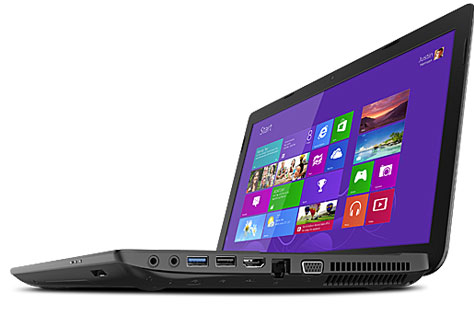
The Toshiba Satellite C55D-A5107 15.6-inch laptop PC won’t impress you with design nor performance, but it’s a solidly built machine with enough computing muscle for day-to-day tasks and multimedia and has a generous data storage space. This laptop is backed by the AMD A6-5200 quad-core processor, which shouldn’t be mistaken for far more powerful Intel i7 quad-core chips, standardly-sized 4GB of RAM, and a 750GB large hard drive. The 1366×768 pixel display is powered by the AMD Radeon HD 8400, which is not a dedicated video card but can provide some gaming potential on low game detail settings and low resolutions. There’s a DVD burner built-in, as well as a full-array of ports and connectivity features, except Bluetooth which is missing. The C55D-A5107 is encased in utilitarian-looking chassis in black color with matte finish.
Specifications
| Brand | Toshiba |
|---|---|
| Screen Size | 15.6-inch |
| Screen Resolution | 1366x768 pixels HD |
| Touchscreen | No touchscreen |
| Other Display Specs | TN type |
| Processor (CPU) | AMD A6-5200 quad-core 2GHz 2MB cache (User Benchmark CPU score: 23) |
| Graphics (GPU) | AMD Radeon HD 8400 integrated graphics (User Benchmark GPU score: 2) |
| System Memory (RAM) Size | 4GB RAM |
| Data Storage | 750GB HDD |
| DVD Optical Drive | DVD writer |
| Keyboard & Input | Non-backlit keyboard with dedicated number pad Touchpad with separate physical click buttons |
| Speakers & Audio | Stereo speakers |
| Camera | Front-facing web camera |
| Wi-Fi Wireless | 802.11N |
| Bluetooth | No |
| Ethernet Network Port | Yes |
| USB Ports | 2 x USB 2.0 + 1 x USB 3.0 |
| Video Output Ports | 1 x HDMI + 1 x VGA |
| Media Card Reader | SD card reader |
| Battery | 6-Cell |
| Height | 1.3" |
| Width | 15" |
| Depth | 9.5" |
| Weight | 5.3 pounds |
| Windows Version | Windows 8.1 |
| Warranty | 1-year |
User Reviews, Questions and Answers
Below you can read and submit user reviews, questions, and answers about the C55D-A5107. Thank you for your contribution.
Please CLICK HERE to provide e-mail for receiving notifications when there are new replies
(The e-mail won't be used for any other purposes.)
More Related Laptops
-

Asus Vivobook Go L510MA-WS05 Affordable Laptop (15.6″ FHD, Intel Celeron N4020, 4GB RAM, 128GB eMMC, 1-yr Microsoft 365)
200 USD* Read More -

HP 15-fd0079wm / A2BZ8UA#ABA Affordable Laptop (15.6″, Intel Celeron N200, 4GB RAM, 128GB UFS, 12-mo. Microsoft 365)
259 USD* Read More -

Acer Aspire 3 A314-36P-3772 14″ Laptop (FHD, Intel Core i3-N305, 8GB RAM, 128GB SSD)
349 USD* Read More -

Asus Zenbook 14 OLED Q415MA-U5512 Laptop (14″ Touch, Intel Ultra 5, 8GB RAM, 512GB SSD)
800 USD* Read More -

HP Stream 14-cf2733wm / A2BZ1UA#ABA Affordable Laptop (14″, Intel Celeron N4120, 4GB RAM, 64GB eMMC, 12-mo Office 365)
129 USD* Read More -

HP Pavilion Plus 16-ab0010nr / 8B898UA#ABA Laptop (16″, Intel i7, 16GB RAM, 512GB SSD)
1,100 USD* Read More -

ASUS TUF A17 FA706NF-RS51 Gaming Laptop (17.3″ FHD 144Hz, AMD Ryzen 5 7535HS, Nvidia RTX 2050, 8GB RAM, 512GB SSD)
785 USD* Read More -

HP 15-fc0037wm / 7W6H6UA#ABA Laptop (15.6″, AMD Ryzen 5 7520U, 8GB RAM, 256GB SSD)
559 USD* Read More -

Lenovo IdeaPad 1 82QD00APUS Laptop (15.6″, Intel i5-1235U, 8GB RAM, 256GB SSD)
444 USD* Read More
5 out of 5
Maria –
I’m trying to remove the hard drive, but after I removed the small screw and popped the corner out, I was unable to remove the other half. How can I remove the hard drive without breaking it in half? I noticed the small snaps beneath the piece, so, I’m wondering why it won’t snap out of place. Thank you.
Notify me of replies Unwatch this thread