
Acer Aspire E1-510-2500
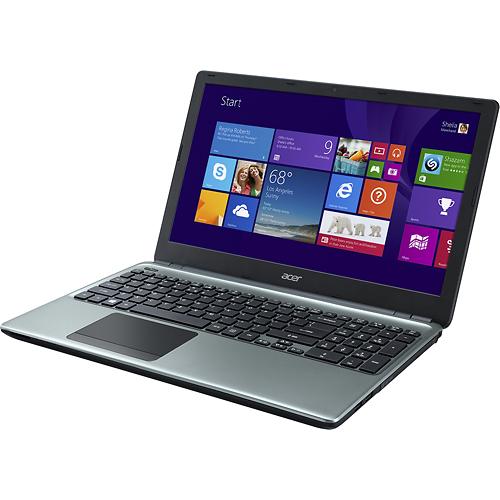
The Acer Aspire E1-510-2500 is one of the cheapest laptops on the market. Only select Chromebook ultraportables are cheaper than it, but keep in mind that the E1-510-2500 offers full-blown Windows PC experience on a standard 15.6-inch display. Acer obviously had to cut some corners in order to deliver the exceptional price, but the laptop is still a fully functional machine. Although the included Intel Celeron N2820 processor features four cores, it’s still just a entry-level chip. It can be used for web surfing and office document editing, as well as audio and video playback, including 1080p videos. If you throw anything more than that on the E1-510-2500 (i.e. video editing, professional photo editing, 3D gaming) the basic nature of the N2820 will be far more noticeable and you’ll experience sluggish performance. For these tasks, you should go for a laptop with Intel Core series processors and dedicated graphics cards, but these are at least twice pricier than the Acer. 4GB of RAM memory included won’t be a bottleneck for sure for all routine computing tasks, while the 500GB hard drive is averagely sized. Also, the screen resolution is mediocre just like on all budget laptops with 1366-by-768 pixel count.
Unfortunately, optical drive is missing, but on the positive side, the notebook is fairly thin, with a profile measuring 1″ high. The weight of 5.2 pounds is average for the category.
The Acer Aspire E1-510-2500 has a full-size keyboard with numeric pad. There’s a four-cell battery, but we have no info on battery life. It should be decent, since the included CPU is one of the most power efficient PC processors on the market. The laptop has stereo speakers, web camera, three USBs, Wi-Fi, Bluetooth and Ethernet LAN connections, a multiformat media card reader, and HDMI video connector. Overall, all necessary features for the home and office user are provided, but if you want a bit better processor speed and a built-in DVD burner for the same price, you can check out the Toshiba C55D-A5120.
Specifications
| Brand | Acer |
|---|---|
| Screen Size | 15.6-inch |
| Screen Resolution | 1366x768 pixels HD |
| Touchscreen | No touchscreen |
| Other Display Specs | TN type |
| Processor (CPU) | Intel Celeron N2820 dual-core 2.4GHz 1MB cache (User Benchmark CPU score: 12) |
| Graphics (GPU) | Intel HD integrated graphics of low-end CPUs (only for the lightest gaming) |
| System Memory (RAM) Size | 4GB RAM |
| Data Storage | 500GB HDD |
| DVD Optical Drive | None |
| Keyboard & Input | Non-backlit keyboard with dedicated number pad Touchpad with separate physical click buttons |
| Speakers & Audio | Stereo speakers |
| Camera | Front-facing web camera |
| Wi-Fi Wireless | 802.11N |
| Bluetooth | Yes |
| Ethernet Network Port | Yes |
| Mobile broadband (4G LTE) | No |
| USB Ports | 2 x USB 2.0 + 1 x USB 3.0 |
| Video Output Ports | 1 x HDMI |
| Media Card Reader | SD card reader |
| Battery | 4-Cell Li-Ion |
| Weight | 5.2 pounds |
| Height | 1" |
| Width | 15" |
| Depth | 10.1" |
| Windows Version | Windows 8.1 |
| Warranty | 1-year |
User Reviews, Questions and Answers
Below you can read and submit user reviews, questions, and answers about the Acer Aspire E1-510-2500. Thank you for your contribution.
Please CLICK HERE to provide e-mail for receiving notifications when there are new replies
(The e-mail won't be used for any other purposes.)
More Related Laptops
-

Asus Vivobook Go L510MA-WS05 Affordable Laptop (15.6″ FHD, Intel Celeron N4020, 4GB RAM, 128GB eMMC, 1-yr Microsoft 365)
200 USD* Read More -

HP 15-fd0079wm / A2BZ8UA#ABA Affordable Laptop (15.6″, Intel Celeron N200, 4GB RAM, 128GB UFS, 12-mo. Microsoft 365)
259 USD* Read More -

Acer Aspire 3 A314-36P-3772 14″ Laptop (FHD, Intel Core i3-N305, 8GB RAM, 128GB SSD)
349 USD* Read More -

Asus Zenbook 14 OLED Q415MA-U5512 Laptop (14″ Touch, Intel Ultra 5, 8GB RAM, 512GB SSD)
800 USD* Read More -

HP Stream 14-cf2733wm / A2BZ1UA#ABA Affordable Laptop (14″, Intel Celeron N4120, 4GB RAM, 64GB eMMC, 12-mo Office 365)
129 USD* Read More -

HP Pavilion Plus 16-ab0010nr / 8B898UA#ABA Laptop (16″, Intel i7, 16GB RAM, 512GB SSD)
1,100 USD* Read More -

ASUS TUF A17 FA706NF-RS51 Gaming Laptop (17.3″ FHD 144Hz, AMD Ryzen 5 7535HS, Nvidia RTX 2050, 8GB RAM, 512GB SSD)
785 USD* Read More -

HP 15-fc0037wm / 7W6H6UA#ABA Laptop (15.6″, AMD Ryzen 5 7520U, 8GB RAM, 256GB SSD)
559 USD* Read More -

Lenovo IdeaPad 1 82QD00APUS Laptop (15.6″, Intel i5-1235U, 8GB RAM, 256GB SSD)
444 USD* Read More
Memory Upgrade?
Dennis –
How many memory slots does this have? 4GB installed, can it be upgraded to 8 GB? If so, would there be any significant boost in performance?
Notify me of replies Unwatch this thread
Bossdee –
how can u install programs wen it doesn’t have DVD Ram or Drive.??? Or Maybe u want to watch movie from a CD plate.
Notify me of replies Unwatch this thread
Danijel Z –
Sue, external USB optical DVD drives play DVDs just like the internal ones. You don’t even have to buy newer USB 3.0 drives, since USB 2.0 provides enough throughput for data transfers from and to DVD drives, which are a kind of slow storage devices generally.
Notify me of replies Unwatch this thread
Sue Matthews –
I don’t think this laptop has a dvd drive. Will dvds play okay if I buy an external drive?
Notify me of replies Unwatch this thread
4 out of 5
David Beeman –
can i install a dvd drive in this computer
Notify me of replies Unwatch this thread