
Asus X550LA-RI7T27 15.6″ Laptop with Intel i7

The Asus X550LA-RI7T27 is a refreshment when it comes to the X550 mainstream notebook PC series. Instead of the budget-class Intel Pentium, Celeron or eventually Core i3 processor, the touch-enabled 15.6-inch X550LA-RI7T27 comes equipped with the speedy and power-efficient Intel Core i7-4500U dual-core CPU. Its not even close speed-wise to the full-blown quad-core i7 usually used in gaming laptops and mobile workstations, but offers nice performance gains over the aforementioned entry-level chips. This is good if you occasionally edit images and videos and convert files from one format to another. RAM size is 8GB. The notebook has no solid state drive, but the included hard disk offers a great capacity of 1 Terabyte. Overall, it has double the amount of storage and RAM memory found in the average inexpensive notebook.
However, the X550LA-RI7T27 is still just a mainstream laptop for home users. It has no dedicated video card and relies on the Intel HD 4400 integrated graphics. This means mediocre graphics potential for gaming. In addition, it is limited when it comes to applications which can utilize a GPU well, such as select image and video editing and 3D modeling programs. Another drawback in comparison to the premium-class laptop is absence of at least 1920×1080 Full HD resolution. Instead, it has the ordinary 1366×768 pixel count. That approximately 720p resolution or half-Full HD.
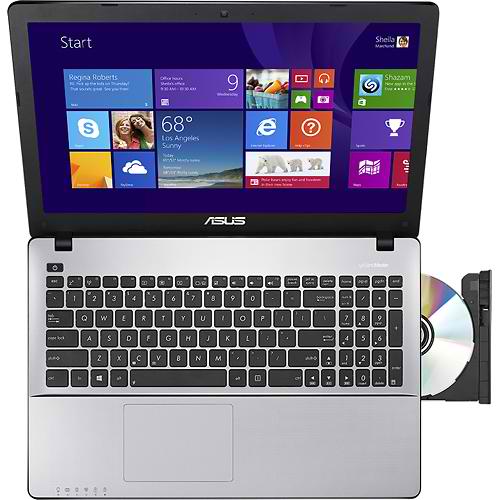
Although it’s one of the better-equipped Asus X550 configurations, this model retains some limitations of the budget configs. There are only two USB ports. Thankfully, one of them can support fast USB 3.0 devices and peripherals. As usual, the laptop has a DVD burner, a pair of speakers, webcam, media card reader, HDMI and VGA video ports, and Wi-Fi and Ethernet LAN connections.
Outwardly, the X550LA-RI7T27 attracts attention with its textured metal-like finish and sleek appearance. But, its actually made of plastics, just like the other models from the series. The keyboard deck holds a full-size keyboard plus a discrete numeric pad on the right. The trackpad is buttonless, so for click it uses lower left and right corners of the surface.

On the end, let’s mention some of the similarly priced alternatives. The first and probably the best is an HP Envy Touchsmart with similarly fast processor, Full HD screen, and keyboard backlight. The second is the Q501LA-BSI5T19 by Asus with an aluminum chassis, 1080p, backlit keys, and slightly slower CPU. Another nice one is Lenovo’s Z510 – 59400199 with similar specs, about hundred bucks lower price, but with no touchscreen.
Specifications
| Brand | Asus |
|---|---|
| Screen Size | 15.6-inch |
| Screen Resolution | 1366x768 pixels HD |
| Touchscreen | Finger multi-touch input |
| Other Display Specs | TN type |
| Processor (CPU) | Intel Core i7-4500U 4th Gen dual-core 1.8-3GHz 4MB cache (User Benchmark CPU score: 39) |
| Graphics (GPU) | Intel HD 4400 integrated graphics |
| System Memory (RAM) Size | 8GB RAM |
| Data Storage | 1000GB (1TB) HDD |
| DVD Optical Drive | DVD writer |
| Keyboard & Input | Non-backlit keyboard with dedicated number pad Touchpad with click buttons built into the surface Touchscreen |
| Camera | Front-facing web camera |
| Speakers & Audio | Stereo speakers |
| Wi-Fi Wireless | 802.11N |
| Ethernet Network Port | Yes |
| USB Ports | 1 x USB 3.0 + 1 x USB 2.0 |
| Video Output Ports | 1 x HDMI + 1 x VGA |
| Media Card Reader | SD card reader |
| Battery | 4-Cell |
| Weight | 5.1 pounds |
| Height | 1.2" |
| Width | 15" |
| Depth | 9.9" |
| Windows Version | Windows 8.1 |
| Warranty | 1-year |
User Reviews, Questions and Answers
Below you can read and submit user reviews, questions, and answers about the Asus X550LA-RI7T27. Thank you for your contribution.
Please CLICK HERE to provide e-mail for receiving notifications when there are new replies
(The e-mail won't be used for any other purposes.)
More Related Laptops
-

Asus Vivobook Go L510MA-WS05 Affordable Laptop (15.6″ FHD, Intel Celeron N4020, 4GB RAM, 128GB eMMC, 1-yr Microsoft 365)
200 USD* Read More -

HP 15-fd0079wm / A2BZ8UA#ABA Affordable Laptop (15.6″, Intel Celeron N200, 4GB RAM, 128GB UFS, 12-mo. Microsoft 365)
259 USD* Read More -

Acer Aspire 3 A314-36P-3772 14″ Laptop (FHD, Intel Core i3-N305, 8GB RAM, 128GB SSD)
349 USD* Read More -

Asus Zenbook 14 OLED Q415MA-U5512 Laptop (14″ Touch, Intel Ultra 5, 8GB RAM, 512GB SSD)
800 USD* Read More -

HP Stream 14-cf2733wm / A2BZ1UA#ABA Affordable Laptop (14″, Intel Celeron N4120, 4GB RAM, 64GB eMMC, 12-mo Office 365)
129 USD* Read More -

HP Pavilion Plus 16-ab0010nr / 8B898UA#ABA Laptop (16″, Intel i7, 16GB RAM, 512GB SSD)
1,100 USD* Read More -

ASUS TUF A17 FA706NF-RS51 Gaming Laptop (17.3″ FHD 144Hz, AMD Ryzen 5 7535HS, Nvidia RTX 2050, 8GB RAM, 512GB SSD)
785 USD* Read More -

HP 15-fc0037wm / 7W6H6UA#ABA Laptop (15.6″, AMD Ryzen 5 7520U, 8GB RAM, 256GB SSD)
559 USD* Read More -

Lenovo IdeaPad 1 82QD00APUS Laptop (15.6″, Intel i5-1235U, 8GB RAM, 256GB SSD)
444 USD* Read More
John Benson –
what is the difference between the Asus X550LA-RI7T27 and the Asus Q550LF-BSI7T21
Notify me of replies Unwatch this thread
Danijel Z –
In short, the Q550LF is better because of the Full HD display instead of 1366×768, IPS wide-viewing angle technogolgy, a dedicated Nvidia video card instead of slower Intel integrated graphics, keyboard backlight, and aluminum chassis instead of plastics. You can see their full specs comparison by adding them to the comparison chart via the “Comare” button located on the end of each laptop description.