
Asus X551MAV-HCL1201E Cheap Full-Size Laptop
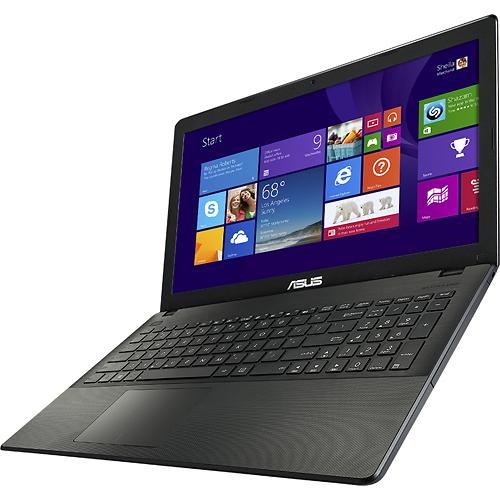
Not too many laptops can be found on the market for under $250. The Asus X551MAV-HCL1201E, also known as X551MAV-HCL1103E and RCLN06, is one of them. The main drawback on these models are low performance processors. As expected, the X551MAV-HCL1201E has one of these. It’s the Intel Celeron N2830 CPU. You can use it for light tasks, such as web browsing, office document creation and editing, and multimedia playback. It will do these jobs pretty much easily, but as soon as you throw anything more complex on it (high-resolution photo editing, video production), it’ll start lagging. If you do these on daily basis, it’s better to get one of the laptops with Intel’s Core i5 or i7 CPUs. Among the cheapest ones are the Acer Aspire E15 E5-571P-59QA and HP 15-p100dx.
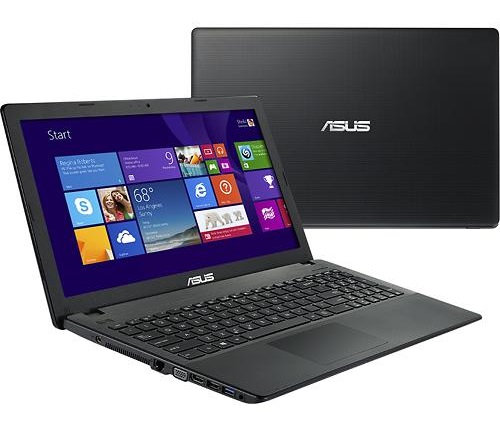
The Asus X551MAV-HCL1201E ships with 4GB of RAM memory, a 500GB hard drive, and 1366-by-768 screen resolution, just like the vast majority of budget laptops. The machine has a DVD writer built-in, as well as stereo speakers, a 0.3-megapixel webcam, Wi-Fi wireless and wired Ethernet LAN network interfaces, one USB 2.0 and one USB 3.0 port, HDMI and VGA video jacks, and a media card reader.
For data input, you can use its full-size keyboard with chiclet-style keys and navigate through Windows and programs via a spacious trackpad.
The battery inside the Asus X551MAV-HCL1201E has 3-cells and 2600 mAh capacity, but info on battery life isn’t provided.
Specifications
| Brand | Asus |
|---|---|
| Screen Size | 15.6-inch |
| Screen Resolution | 1366x768 pixels HD |
| Touchscreen | No touchscreen |
| Other Display Specs | TN type |
| Processor (CPU) | Intel Celeron N2830 dual-core 2.16-2.41GHz 1MB cache (User Benchmark CPU score: 12) |
| Graphics (GPU) | Intel HD integrated graphics of low-end CPUs (only for the lightest gaming) |
| System Memory (RAM) Size | 4GB RAM |
| Data Storage | 500GB HDD |
| DVD Optical Drive | DVD writer |
| Camera | Front-facing web camera |
| Speakers & Audio | Stereo speakers |
| Wi-Fi Wireless | 802.11N |
| Ethernet Network Port | Yes |
| Mobile broadband (4G LTE) | No |
| Bluetooth | No |
| USB Ports | 1 x USB 3.0 + 1 x USB 2.0 |
| Video Output Ports | 1 x HDMI + 1 x VGA |
| Media Card Reader | SD card reader |
| Battery | 3-Cell 2600 mAh |
| Weight | 4.7 pounds |
| Height | 1.2" |
| Width | 15" |
| Depth | 9.9" |
| Windows Version | Windows 8.1 |
| Warranty | 1-year |
User Reviews, Questions and Answers
Below you can read and submit user reviews, questions, and answers about the Asus X551MAV-HCL1201E. Thank you for your contribution.
Please CLICK HERE to provide e-mail for receiving notifications when there are new replies
(The e-mail won't be used for any other purposes.)
More Related Laptops
-

Asus Vivobook Go L510MA-WS05 Affordable Laptop (15.6″ FHD, Intel Celeron N4020, 4GB RAM, 128GB eMMC, 1-yr Microsoft 365)
200 USD* Read More -

HP 15-fd0079wm / A2BZ8UA#ABA Affordable Laptop (15.6″, Intel Celeron N200, 4GB RAM, 128GB UFS, 12-mo. Microsoft 365)
259 USD* Read More -

Acer Aspire 3 A314-36P-3772 14″ Laptop (FHD, Intel Core i3-N305, 8GB RAM, 128GB SSD)
349 USD* Read More -

Asus Zenbook 14 OLED Q415MA-U5512 Laptop (14″ Touch, Intel Ultra 5, 8GB RAM, 512GB SSD)
800 USD* Read More -

HP Stream 14-cf2733wm / A2BZ1UA#ABA Affordable Laptop (14″, Intel Celeron N4120, 4GB RAM, 64GB eMMC, 12-mo Office 365)
129 USD* Read More -

HP Pavilion Plus 16-ab0010nr / 8B898UA#ABA Laptop (16″, Intel i7, 16GB RAM, 512GB SSD)
1,100 USD* Read More -

ASUS TUF A17 FA706NF-RS51 Gaming Laptop (17.3″ FHD 144Hz, AMD Ryzen 5 7535HS, Nvidia RTX 2050, 8GB RAM, 512GB SSD)
785 USD* Read More -

HP 15-fc0037wm / 7W6H6UA#ABA Laptop (15.6″, AMD Ryzen 5 7520U, 8GB RAM, 256GB SSD)
559 USD* Read More -

Lenovo IdeaPad 1 82QD00APUS Laptop (15.6″, Intel i5-1235U, 8GB RAM, 256GB SSD)
444 USD* Read More
Sean –
Ram can be upgraded, went from the stock Kingston 4gb to a hyper x 8gb without any adjustments or aid from software for set up. Just pulled out the old one and set the new one in
Notify me of replies Unwatch this thread
Robert –
Although this laptop “claims” that it can only have 4GB of RAM, I found elsewhere someone who was able to upgrade to 8GB of RAM! The person has screenshots of stress tests to prove it. See here https://linustechtips.com/main/topic/812220-8gb-ram-module-compatible-with-asus-x551mav-eb01-b/
I am going to visit BestBuy “Geek Squad” and have them provide me a RAM to see if it works. Good luck to others if you want to test it out!
Notify me of replies Unwatch this thread
Robert –
[UPDATE] This laptop CAN be upgraded from 4GB to 8GB of RAM, ONLY if you have Linux installed. My wife has Elementary OS installed and it recognized it immediately. She now has 8GB of RAM, an upgraded SSD of 500GB, a new 4-cell battery(better than the original battery, lasts longer) and a USB Wi-Fi adapter to connect to 5.8GHZ for fast internet connection. Of course, all of these were purchased one at a time during the last 3 months but the end result is awesome! Boots in 12 seconds and shutsdown in 2 seconds.
Carter –
Anyone crack this laptop open and look at the motherboard it has? I’m thinking about changing out the CPU for a better one and adding more ram/filling the 2nd slot available. It’s a good computer but i want it to do a bit more than it does.
Notify me of replies Unwatch this thread
bret –
I don’t think you can upgrade it, since the CPU is soldered onto the motherboard.
5 out of 5
Adrien Beaudry –
I bought this laptop 6 months ago worth the money. liked that for the money u got a optical drive and the keyboard works well for me. i liked that the track pad worked and the computer
did not over heat. I would say worth the money
Notify me of replies Unwatch this thread
4 out of 5
adam –
The ram is not upgradable beyond 4 gigs it’s the max the system can handle. crucial.com search
Notify me of replies Unwatch this thread
Robert –
This laptop CAN be upgraded from 4GB to 8GB of RAM, ONLY if you have Linux installed. My wife has Elementary OS installed and it recognized it immediately. She now has 8GB of RAM, an upgraded SSD of 500GB, a new 4-cell battery(better than the original battery, lasts longer) and a USB Wi-Fi adapter to connect to 5.8GHZ for fast internet connection. Of course, all of these were purchased one at a time during the last 3 months but the end result is awesome! Boots in 12 seconds and shutsdown in 2 seconds.
Amanda –
Does it handle watching movies, Youtube videos and streaming videos off a place like Hulu smoothly? I only need a computer for writing, browsing the internet and watching videos. Can this laptop do these without being slow and choppy?
Notify me of replies Unwatch this thread
Danijel Z –
Maybe this answer comes too late, but here it is:
The CPU can handle video streams up to 1080p resolution well, without hiccups. Text editing and websurf also run smooth. More about the chip and its real life performance you can read in this review:
http://laptoping.com/intel-celeron-n2830-n2820-specs-benchmark.html
Overall, I think this laptop will suite your needs without being too slow.
Chip –
$197 at BB today. I have the Toshiba C55-B5202, also with 4GB RAM and not upgradeable; can the RAM or HD on the ASUS be upgraded?
Notify me of replies Unwatch this thread