
HP Envy TouchSmart m6-n113dx Laptop with AMD FX Processor
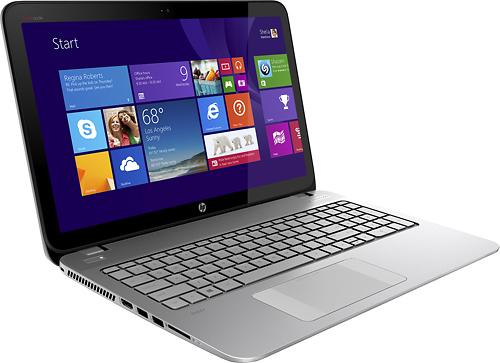
The HP Envy TouchSmart m6-n113dx touchscreen-enabled 15.6-incher is the first available laptop on the market with the AMD FX “Kaveri” processor, launched earlier this year. The long awaited chip finally enables AMD to compete head-to-head with Intel in the higher-end notebook CPU segment.
The processor used in the m6-n113dx is the AMD FX 7500 quad-core at up to 3.3GHz, which is comparable to the popular Intel Core i7-4500U/4510U dual-core in terms of CPU speed and power consumption. Both are optimized for use in thin notebooks. According to AMD, the chips have similar CPU performance and PassMark benchmarks confirm that (~3750 vs ~3900 points in Intel’s favor). In the real world use, this should mean sufficient horsepower for the daily chores and demanding photo and video editing as well. However, in the integrated graphics department the FX 7500 with its Radeon R7 series IGP is noticeably better than the i7’s Intel HD 4400, with claimed advantage of over 50 percent in 3DMark benchmarks. In the real world use, it should mean you’ll be able to crank graphics settings and resolution up from the lowest ones, but mid- and higher-end gaming is still reserved for gaming-class dedicated video cards. The display however supports resolutions of up to 1366×768 pixels, whereas some other laptops in the same price range ship with sharper 1920×1080 screens, so the pixel count is a downside of this machine.
Alongside the new CPU and touchscreen, the main characteristics of HP’s Envy TouchSmart m6-n113dx are 6GB of RAM memory which is enough for all realistic computing scenarios, a 750GB hard drive which is the performance bottleneck of the system because of slow 5,400rpm rotating speed, a backlit keyboard with numeric pad, advanced Control Zone touchpad with integrated click buttons and support for extra Windows 8-specific touch gestures, and stereo speakers accompanied by a subwoofer.
The laptop has a web camera, four USB ports, HDMI video output connector, Wi-Fi wireless and Gigabit LAN network connections, Bluetooth, and a multi-format media card reader. It has no built-in DVD drive.
The battery has a capacity of 2,200 mAh, but we have no info on the battery life.
The 1.2″ thick chassis sports a glass-fiber construction with soft-touch paint in natural silver color. The whole notebook is a bit hefty with a weight of 6.1 pounds, especially given it lacks a DVD.
Overall, for around $650, the m6-n113dx offers a good bang for your buck, since laptops with the corresponding Intel i7 are pricier. However, a lack of a Full HD display will make sales a bit harder, since you can get a Full HD laptop with IPS wide viewing angles additionally for the same amount. The Dell Inspiron I7547-3020SLV is a food example.

Specifications
| Brand | HP |
|---|---|
| Screen Size | 15.6-inch |
| Screen Resolution | 1366x768 pixels HD |
| Touchscreen | Finger multi-touch input |
| Other Display Specs | TN type |
| Processor (CPU) | AMD FX 7500 quad-core 2.1-3.3GHz 4MB cache (User Benchmark CPU score: 26) |
| Graphics (GPU) | AMD Radeon R7 integrated graphics (for very light gaming) |
| System Memory (RAM) Size | 6GB RAM |
| Data Storage | 750GB HDD |
| DVD Optical Drive | None |
| Keyboard & Input | Backlit keyboard with dedicated number pad Touchpad with click buttons built into the surface Touchscreen |
| Speakers & Audio | Stereo speakers with subwoofer |
| Camera | Front-facing web camera |
| Wi-Fi Wireless | 802.11N |
| Ethernet Network Port | Yes |
| Bluetooth | Yes |
| Mobile broadband (4G LTE) | No |
| USB Ports | 2 x USB 3.0 + 2 x USB 2.0 |
| Video Output Ports | 1 x HDMI |
| Media Card Reader | SD card reader |
| Battery | 6-Cell 2200 mAh |
| Weight | 6.1 pounds |
| Height | 1.2" |
| Width | 14.9" |
| Depth | 9.9" |
| Windows Version | Windows 8.1 |
| Warranty | 1-year |
User Reviews, Questions and Answers
Below you can read and submit user reviews, questions, and answers about the HP Envy TouchSmart m6-n113dx. Thank you for your contribution.
Please CLICK HERE to provide e-mail for receiving notifications when there are new replies
(The e-mail won't be used for any other purposes.)
More Related Laptops
-

Asus Vivobook Go L510MA-WS05 Affordable Laptop (15.6″ FHD, Intel Celeron N4020, 4GB RAM, 128GB eMMC, 1-yr Microsoft 365)
200 USD* Read More -

HP 15-fd0079wm / A2BZ8UA#ABA Affordable Laptop (15.6″, Intel Celeron N200, 4GB RAM, 128GB UFS, 12-mo. Microsoft 365)
259 USD* Read More -

Acer Aspire 3 A314-36P-3772 14″ Laptop (FHD, Intel Core i3-N305, 8GB RAM, 128GB SSD)
349 USD* Read More -

Asus Zenbook 14 OLED Q415MA-U5512 Laptop (14″ Touch, Intel Ultra 5, 8GB RAM, 512GB SSD)
800 USD* Read More -

HP Stream 14-cf2733wm / A2BZ1UA#ABA Affordable Laptop (14″, Intel Celeron N4120, 4GB RAM, 64GB eMMC, 12-mo Office 365)
129 USD* Read More -

HP Pavilion Plus 16-ab0010nr / 8B898UA#ABA Laptop (16″, Intel i7, 16GB RAM, 512GB SSD)
1,100 USD* Read More -

ASUS TUF A17 FA706NF-RS51 Gaming Laptop (17.3″ FHD 144Hz, AMD Ryzen 5 7535HS, Nvidia RTX 2050, 8GB RAM, 512GB SSD)
785 USD* Read More -

HP 15-fc0037wm / 7W6H6UA#ABA Laptop (15.6″, AMD Ryzen 5 7520U, 8GB RAM, 256GB SSD)
559 USD* Read More -

Lenovo IdeaPad 1 82QD00APUS Laptop (15.6″, Intel i5-1235U, 8GB RAM, 256GB SSD)
444 USD* Read More
4 out of 5
E. C. –
Good GPU and good CPU, with a nice keyboard and decent screen. Sub-par HDD with inadequate RAM right out of the box, but both problems are easy fixes. I stuck a 250 gb samsung SSD and 16 gb of RAM and now the thing runs like a racecar.
Notify me of replies Unwatch this thread
5 out of 5
Sly Boy –
great but is it best for fifa gaming?
Notify me of replies Unwatch this thread
Jordan –
I out 2x 8gig OWC ram into this laptop. Things have been running smoothly, but I’m still not sure if I should be concerned about it frying my computer in the near future. Does anyone have any thoughts on if I installed some okay-for-my-computer hardware?
Notify me of replies Unwatch this thread
4 out of 5
Jordan –
I have had this laptop for quite a while and I have yet to experience any problems that I have read about it. Unfortunately I didn’t read at all about the laptop at all before I purchased it. I have updated the ram and was considering trying to change the CPU because 2.1 ghz is not enough for me. Then after some reading, I found that it can go up to 3.3? How exactly would I be able to boost it up that high?? Could someone email me and help me?
Notify me of replies Unwatch this thread
philip –
Can I just upgrade the ram size with any DDR3 or should i use the system required ram specifications
Notify me of replies Unwatch this thread
Danijel Z –
You should match the RAM specs, but in my experience all DDR3 SO-DIMM RAM modules are compatible with all modern DDR3-based laptops.
4 out of 5
Gilgamesh –
I ran into a major problem with ram. Check into speck and match exactly with manufacturer. Also make sure and split total across 2 chips. I.E. want 32 gig get 2 16 gig chips. Exact matches. Also you have to get into bios and change a setting or 2. I crashed mine 3 times in process so i wound up letting Geek Squad clean it all up and install correct ram. After reinstall of O.S. all is well. Check ALL specs first!
1 out of 5
Jade –
The touchpad is so glitchy to the point that it is unusable. This laptop has great features that make it great for the price, but unless you’re willing to exclusively use a wired mouse and disable the touchpad, it is useless. Very frustrating product. I’ve only had it for half a week and I wish I had read the reviews and discovered this problem before I bought the laptop. HP Technical Support doesn’t seem to have a solution to this problem on their forums. Also, there are updates that happen every single time that I’ve restarted or turned off the laptop, and they take ages to complete. The last time, I got the error message: “We couldn’t complete the changes. Undoing changes now. Don’t turn off computer.” And it has been showing that message for over half an hour. Complete garbage!
Notify me of replies Unwatch this thread
5 out of 5
Rob –
laptop fits my needs, plays most modern games, would bog down during very intensive workload (firefox with 15 tabs open, netflix, running COD, microsoft office open) before i upgraded ram to 16gb. backlit keyboard is a must. great buy
Notify me of replies Unwatch this thread
Colby –
I just purchased this laptop, could you please refer me to the memory you used for your upgrade?
5 out of 5
Tafara –
What games can I play on it.
Notify me of replies Unwatch this thread
Boot –
Pretty much anything outside of the higher end games (likely all the way up to WOW) should be able to be handled on this system.
Anything like COD, Crisis, Far Cry, Battlefield 4, etc… is likely going to eventually fry your CPU/built in graphics over time if played on this system (You’ll want something with a separate graphics card instead of an integrated graphics chipset.
4 out of 5
Tafara Machiri –
Please explain to me because i got one. should i upgrade it and is it possible to upgrade graphics.could i also upgrade ram. could u please respond to my email. “boot”
Gilgamesh –
I disagree. I run all Bioshock, Half-Life 1, 2, 3, Oblivion, Skyrim, Fallout 3 and 4, Vanishing of Ethan Carter, and a lot more. Only probs is in EXTREME action such as in Skyrim when fighting dragons on top of hill with view set far i get a slight tear. If the pc is kept clean ie blow out cooling fan regularly and keep pc on a table or lap table for unobstructed air flow, then no issues should occur. That said i am looking into external graphics card for my pc. I have found a dock where i can run usb to dock thru external video card to external monitor. This will give me a desktop feel and power without alot of hassle.
1 out of 5
Steve Roberts –
Do yourself a favor and avoid this laptop like the Plague! I’m on my second one due to the first having extremely slow download/wifi issues, and the mouse pad being completely useless! I’ve logged several hours on the HP help phone-line, and while nice, the language barrier is frustrating on top of being frustrated! I’m on my second after a swap-out with Best Buy, and the mouse issue is still at best intermittent. (Solved with a USB mouse) I still have terrible download speeds, and drop the wifi constantly. (Disconnecting/reconnecting seems to be the only fix) So far all HP has done is have me block up-dates to keep it from getting even more screwed up. My Pavilion shares the same wifi and has none of these issues This is my last HP!
Notify me of replies Unwatch this thread
Marshall –
Those complaining about Wifi Dropping, or download issues… this is because of Windows 8.1 – Not the actual laptop. Windows Changed the driver requirement in Windows 8.1
5 out of 5
Gilgamesh –
Agreed