
Asus G751JL-BSI7T28 17.3″ Gaming Laptop with Nvidia GTX 965M

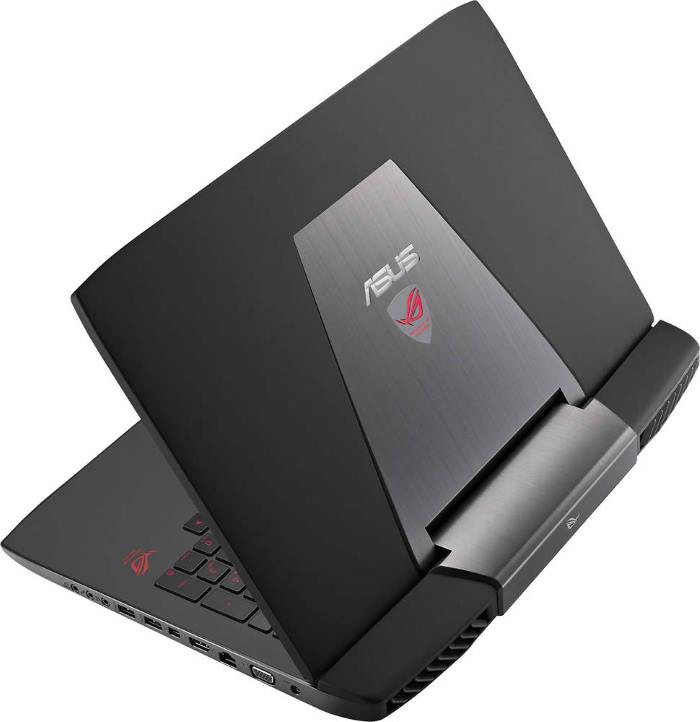
The Asus G751JL-BSI7T28 is a 17.3-inch gaming laptop which delivers solid graphics performance without breaking the bank. Besides the Nvidia GeForce GTX 965M 2GB dedicated video card, highlights of the aluminum-skinned G751JL-BSI7T28 are a Full HD IPS touchscreen display, the Intel Core i7-4720HQ quad-core processor, 8GB of system memory, a 1-Terabyte hard drive, keyboard backlight in red color, and stereo speakers backed by a bass subwoofer.
The GTX 965M is an upper-mid-range GPU. It can run the latest blockbuster games on Full HD resolution and high settings, as described here. Main computing is done on the powerful i7-4720HQ CPU, which is one of the fastest you can find in laptops these days. Coupled with 8GB of RAM, it won’t be a bottleneck of the system and can serve as a good solution for other demanding operations, such as work in photography and video editing software. The 1TB hard disk inside the G751JL-BSI7T28 belongs to the slow 5,400rpm category, so game loading won’t be as fast as on the 7,200rpm HDDs or solid state drives. But, it provides ample of storage space for game installations. They can be very large these days, with select games requiring more than 50GB of space. The laptop has a great upgrade potential, since it has a total of four RAM slots for up to 32GB of system memory, and dual storage bays.
The Full HD 1920×1080-pixel display resolution is a standard in the gaming notebook category these days and is sharper than 1600×900 displays you can find on the common mainstream 17.3-inchers. Touchscreen isn’t a common feature among gaming notebooks, but this model has it. As a good selling point, the display provides IPS-class wide viewing angles.
Other important features include a built-in DVD writer optical drive, a 720p web camera, and robust video output potential thanks to mini DisplayPort/FireWire, HDMI, and VGA connectors. The laptop has four USB 3.0 ports, 802.11AC Wi-Fi wireless and Gigabit Ethernet network connections, Bluetooth, and a media card reader.
If you want an ultimate gaming performance, you can check out some of the pricier G751 configurations, such as the G751JT-CH71 and G751JY-DH71, with faster GeForce GTX 970M and 980M video cards respectively and larger RAM sizes.
Specifications
| Brand | Asus |
|---|---|
| Screen Size | 17.3-inch |
| Screen Resolution | 1920x1080 pixels Full HD |
| Touchscreen | Finger multi-touch input |
| Other Display Specs | IPS type |
| Processor (CPU) | Intel Core i7-4720HQ 4th Gen quad-core 2.6-3.6GHz 6MB cache (~8,200 PassMark benchmark points) |
| Graphics (GPU) | Nvidia GeForce GTX 965M 2GB GDDR5 "Maxwell" dedicated video card (for light gaming, but with improved smoothness) |
| System Memory (RAM) Size | 8GB RAM |
| Data Storage | 1000GB (1TB) HDD |
| DVD Optical Drive | DVD writer |
| Keyboard & Input | Backlit keyboard with dedicated number pad Touchpad with separate physical click buttons |
| Speakers & Audio | Stereo speakers with subwoofer Separate mic and headphones audio jacks SPDIF audio output |
| Camera | Front-facing web camera |
| Wi-Fi Wireless | 802.11AC |
| Bluetooth | Yes |
| Ethernet Network Port | Yes |
| USB Ports | 4 x USB 3.0 |
| Video Output Ports | 1 x HDMI + 1 x VGA 1 x mini DisplayPort |
| Media Card Reader | SD card reader |
| Other Features | Thunderbolt port |
| Battery | 8-cell lithium ion, "up to 4 hours" battery life |
| Weight | 8.4 pounds |
| Height | 1.7" |
| Width | 16.4" |
| Depth | 12.5-inch |
| Windows Version | Windows 8.1 |
| Warranty | 1-year |
User Reviews, Questions and Answers
Below you can read and submit user reviews, questions, and answers about the Asus G751JL-BSI7T28. Thank you for your contribution.
Please CLICK HERE to provide e-mail for receiving notifications when there are new replies
(The e-mail won't be used for any other purposes.)
More Related Laptops
-

Asus Vivobook Go L510MA-WS05 Affordable Laptop (15.6″ FHD, Intel Celeron N4020, 4GB RAM, 128GB eMMC, 1-yr Microsoft 365)
200 USD* Read More -

HP 15-fd0079wm / A2BZ8UA#ABA Affordable Laptop (15.6″, Intel Celeron N200, 4GB RAM, 128GB UFS, 12-mo. Microsoft 365)
259 USD* Read More -

Acer Aspire 3 A314-36P-3772 14″ Laptop (FHD, Intel Core i3-N305, 8GB RAM, 128GB SSD)
349 USD* Read More -

Asus Zenbook 14 OLED Q415MA-U5512 Laptop (14″ Touch, Intel Ultra 5, 8GB RAM, 512GB SSD)
800 USD* Read More -

HP Stream 14-cf2733wm / A2BZ1UA#ABA Affordable Laptop (14″, Intel Celeron N4120, 4GB RAM, 64GB eMMC, 12-mo Office 365)
129 USD* Read More -

HP Pavilion Plus 16-ab0010nr / 8B898UA#ABA Laptop (16″, Intel i7, 16GB RAM, 512GB SSD)
1,100 USD* Read More -

ASUS TUF A17 FA706NF-RS51 Gaming Laptop (17.3″ FHD 144Hz, AMD Ryzen 5 7535HS, Nvidia RTX 2050, 8GB RAM, 512GB SSD)
785 USD* Read More -

HP 15-fc0037wm / 7W6H6UA#ABA Laptop (15.6″, AMD Ryzen 5 7520U, 8GB RAM, 256GB SSD)
559 USD* Read More -

Lenovo IdeaPad 1 82QD00APUS Laptop (15.6″, Intel i5-1235U, 8GB RAM, 256GB SSD)
444 USD* Read More
5 out of 5
John Doe –
Thank you for all the help and effort! In the meanwhile the price has gone up. Nonetheless you have been extremely helpful. I have liked and followed your page on Facebook. 🙂
Notify me of replies Unwatch this thread
3 out of 5
John Doe –
Hi, first of all thank you for the review. Why is this ASUS model not listed on their own website. It is listed on C-Net and is this a custom or limited edition? All the other websites including ASUS have this model ‘ASUS ROG G751JL-BSI7T28’ listed as ‘ASUS ROG G751JL-DS71’. The difference between the two is that the one you have listed here has a touch enabled screen 8gb ram and no SSD, while the other one has no touch enabled screen yet it has a 128gb SSD and 16gb of ram. Could you please clarify this I’m confused. Thank you.
Notify me of replies Unwatch this thread
John Doe –
Oh yeah and one more thing I forgot to mention in the differences is that the DS71 has a 7200rpm HDD.
John Doe –
I’m sorry for posting again but there is no way to edit my earlier comment, I seem to have made another mistake there is no SSD included in the DS71 it comes with the DS74 model.
Danijel Z –
The Asus G75xxx series with letter B in the second part of the model name, like the G751JL-BSI7T28, are usually Best Buy’s exclusive models and have lower-end specs. Touchscreen is an exception in this case. As you said, touch display, RAM size, and hard drive speed are the differences between it and the G751JL-DS71, which is sold by various retailers.
John Doe –
I knew the the T was for touch and had a feeling that B might be for Best Buy, but was not sure. Now that it has been confirmed thank you. I originally wanted to buy the 15.6″ DS74 but have read a lot of reviews stating it is plagued by the BSOD, Bios Loop and power state failure. Hence I decided to go with the 17.3″ DS71 but then I saw your review and found out that the same could be had with an added touch screen. Now all I would like to know is that the problems stated for the DS74 a one off thing and do you recommend buying it? If not which would you recommend between the BSI7T28 and DS71? Your input on this would be greatly helpful in making me decide which one to buy.
Danijel Z –
I assume the DS74 15.6″ you mentioned is from the GL551JW series. That’s entirely different laptop series from the G751, so they probably don’t have the same problems (I’ve checked user reviews of the G751JL on Best Buy, and it looks like nobody has the problems you mentioned).
I wouldn’t pay to much attention to the RAM size and HDD speed differences between the BSI7T28 and DS71, since these components can be easily upgraded via the removable bottom panel. 8GB of RAM is enough for most usage scenarios, but if you still want to upgrade it, you have four RAM slots in the laptop (two are occupied on the BSI7T28). There are two storage bays, so you can for instance add an SSD drive, install OS on it, and keep the existing 1TB HDD for storing files. That would tremendously speed up Windows and program loading in comparison to 5,400rpm and 7,200rpm HDDs.
If prices are the same, I would go for the BSI7T28 because of the touchscreen. This feature can be handy in everyday use and it would be hard and costly to add it later. On the downside, touchscreen consumes a bit more power, so the battery life will be somewhat shorter in comparison to the non-touch model.
The GL551JW has a weaker video card and no touchscreen, so I consider the BSI7T28 to be the best choice among the three models.
5 out of 5
John Doe –
Thank you Daniejl Z! You don’t know how long I have been researching trying to make the right decision. It’s been a few sleepless nights but now I can take a breather, finally. What you have pointed out above I concur 100%! I shall be getting the BSI7T28 indeed. Now the only thing that is making me slightly hesitant is the fact there is no mention of the power adapter wattage in the specs. If they are the following (perfect)
Power Adapter
Output : 19.5 V DC, 9.23 A, 180 W
Input : 100 -240 V AC, 50/60 Hz universal
3/ 2 pin compact power supply system
The above is a copy and paste from the ASUS official webpage for
ASUS ROG G751JL-DS71 Intel i7 2.6GHz 16GB Memory 1TB HDD GTX965M 2GB 17.3-inch Full HD Gaming Laptop without the touch and fast HDD rest is the same so I’m hoping Power would be the same wattage also. One more thing I noticed was that DS71 mentions an array mic built in while there is no mention for it in the specs for BSI7T28. I’m already greatly obliged thank you.
Danijel Z –
I’m not 100% sure, but I assume the chargers are the same, since these models are basically the same notebooks with some different components. The same applies to the microphones. If you take a closer look at the images of the G751JL-BSI7T28, you’ll notice two microphone holes on the top LCD bezel, which very likely means dual mics are built-in.
Luis Alarcon –
I was wondering if these computers have included any graphics card by default. i
bought one and the performance is not the same as i thought. I looked in others computers and actually they have this, must of them. i wolud like your help in this.
Notify me of replies Unwatch this thread
Danijel Z –
Yes, the Nvidia GeForce GTX 965M is included by default and is a good upper-mid-range card. What you can do is go to your Nvidia settings in Windows and check whether the games are set to use the 965M instead of the weak Intel HD which is on the processor. Also in Device Manager you can check whether your drivers are properly installed. Another thing is that when running on the battery instead of AC power, some laptops have to reduce graphics performance in order to work properly.