
Toshiba Satellite CL45-C4370 Laptop With 14″ Screen, Intel Celeron CPU, 2GB RAM, 32GB eMMC
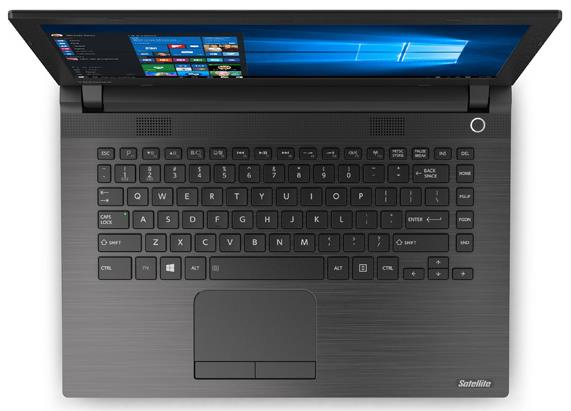
The Toshiba Satellite CL45-C4370 is among the cheapest full-size laptops. The Windows 10-based notebook has a bit smaller than standard screen, since it diagonal measures 14″ instead of more common 15.6-inch. As expected, for the given price the laptop doesn’t deliver anything more than just very basic computing performance, storage space, and other features.
There’s no info on the exact Intel Celeron CPU model in the specs sheet of the Satellite CL45-C4370. Since all other CL45 configurations include the Celeron N2840 “Bay Trail” dual-core processor, it’s safe to assume the offered configuration has the same chip, too. The N2840 is a dual-core chip from last year’s Bay Trail CPU lineup and is a typical budget CPU with sufficient power only for basic computing. The chip does a good job when it comes to webpage rendering, video and audio playback, or work in Office applications. Furthermore, it also supports some popular entry-level games like League of Legends or Minecraft at low graphics detail settings. For more info on the Celeron N2840, check out our review. A potential multitasking-related bottleneck is a low amount of system memory. The notebook includes only 2GB of RAM, which is enough only if you keep number of simultaneously running programs and browser tabs at a minimum. Storage space is quite limited, too. With 32GB eMMC capacity and Windows 10 occupying around half of that size, users are left with around 15GB for their files and program installations. A partial solution for this problem might be using the built-in SD memory card reader for storage expansion. A DVD burner is missing on this model.

The 14″ screen sports the common 1366-by-768 pixel display resolution. Touchscreen, IPS wide viewing angles, and Full HD picture sharpness are missing, so the LCD panel is a very basic one.
The 14″ laptops usually don’t have dedicated numeric pads on their keyboards and this model is no exception.
Toshiba’s CL45-C4370 “no-fills” machine has stereo speakers, a HD 720p web camera, one USB 3.0 and two USB 2.0 ports, HDMI video output, a headphones / microphone 2-in-1 port, and 802.11N wireless.
The battery capacity of 45 WHr is quite good for a budget-class laptop, especially given it has low-power components and a bit smaller than standard screen size. Toshiba claims the Satellite CL45-C4370 can achieve “up to 7 hours” of power autonomy.
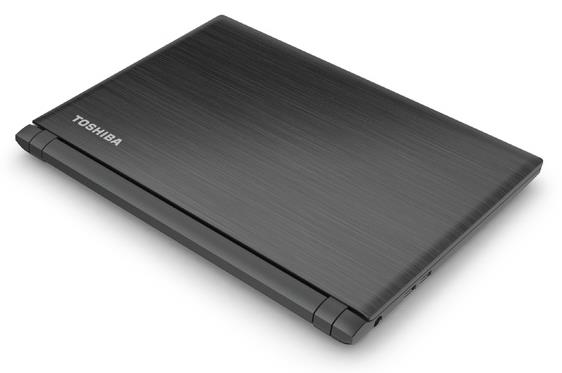
Design-wise, the machine has an utilitarian-looking plastic chassis. A brushed-metal-like finish adds a bit of attractiveness to it, as same as its relatively thin 0.9″ profile.
The laptop weighs in at 4.2 pounds, making it noticeably lighter than common 15.6″ ~5-pound notebooks.
Specifications
| Brand | Toshiba |
|---|---|
| Screen Size | 14-inch |
| Screen Resolution | 1366x768 pixels HD |
| Touchscreen | No touchscreen |
| Other Display Specs | TN type |
| Processor (CPU) | Intel Celeron N2840 dual-core 2.16-2.58GHz 1MB cache (User Benchmark CPU score: 13) |
| Graphics (GPU) | Intel HD integrated graphics of low-end CPUs (only for the lightest gaming) |
| System Memory (RAM) Size | 2GB RAM |
| Data Storage | 32GB eMMC |
| DVD Optical Drive | None |
| Keyboard & Input | Non-backlit keyboard without dedicated number pad Touchpad with separate physical click buttons |
| Speakers & Audio | Stereo speakers Combo microphone and headphones audio jack |
| Camera | Front-facing web camera |
| Wi-Fi Wireless | 802.11N |
| Ethernet Network Port | No |
| Mobile broadband (4G LTE) | No |
| Bluetooth | No |
| USB Ports | 2 x USB 2.0 + 1 x USB 3.0 |
| Video Output Ports | 1 x HDMI |
| Media Card Reader | SD card reader |
| Battery | "up to 7 hours" of battery life 4-Cell 45 WHr |
| Weight | 4.2 pounds |
| Height | 0.9" |
| Width | 13.5" |
| Depth | 9.6" |
| Windows Version | Windows 10 Home |
| Warranty | 1-year |
User Reviews, Questions and Answers
Below you can read and submit user reviews, questions, and answers about the Toshiba Satellite CL45-C4370. Thank you for your contribution.
Please CLICK HERE to provide e-mail for receiving notifications when there are new replies
(The e-mail won't be used for any other purposes.)
More Related Laptops
-

Asus Vivobook Go L510MA-WS05 Affordable Laptop (15.6″ FHD, Intel Celeron N4020, 4GB RAM, 128GB eMMC, 1-yr Microsoft 365)
200 USD* Read More -

HP 15-fd0079wm / A2BZ8UA#ABA Affordable Laptop (15.6″, Intel Celeron N200, 4GB RAM, 128GB UFS, 12-mo. Microsoft 365)
259 USD* Read More -

Acer Aspire 3 A314-36P-3772 14″ Laptop (FHD, Intel Core i3-N305, 8GB RAM, 128GB SSD)
349 USD* Read More -

Asus Zenbook 14 OLED Q415MA-U5512 Laptop (14″ Touch, Intel Ultra 5, 8GB RAM, 512GB SSD)
800 USD* Read More -

HP Stream 14-cf2733wm / A2BZ1UA#ABA Affordable Laptop (14″, Intel Celeron N4120, 4GB RAM, 64GB eMMC, 12-mo Office 365)
129 USD* Read More -

HP Pavilion Plus 16-ab0010nr / 8B898UA#ABA Laptop (16″, Intel i7, 16GB RAM, 512GB SSD)
1,100 USD* Read More -

ASUS TUF A17 FA706NF-RS51 Gaming Laptop (17.3″ FHD 144Hz, AMD Ryzen 5 7535HS, Nvidia RTX 2050, 8GB RAM, 512GB SSD)
785 USD* Read More -

HP 15-fc0037wm / 7W6H6UA#ABA Laptop (15.6″, AMD Ryzen 5 7520U, 8GB RAM, 256GB SSD)
559 USD* Read More -

Lenovo IdeaPad 1 82QD00APUS Laptop (15.6″, Intel i5-1235U, 8GB RAM, 256GB SSD)
444 USD* Read More
3 out of 5 Works great with Kubuntu (Linux)
Frank Zimmerman –
I received one of these from a customer (I’m a computer tech). It stalled on Windows updates as there wasn’t enough room. The 2GB RAM was also insufficient really to run Windows properly. I wiped off Windows and put Kubuntu Linux on it, and it works just wonderfully now! Linux sometimes has problems with sleep-mode, or microphone, on laptops, but this one worked perfectly. It’s really gained a new life under Linux, which uses about half the RAM of Windows, and much less drive space.
Notify me of replies Unwatch this thread
Help
Thea Moreno –
There’s no hard drive and when we plan to buy one (since Windows 10 practically used up 30GB of the space), someone said it wasn’t advisable because it’ll make the laptop process slower (of course, despite the fact that it has only 2GB RAM) but I would like to clarify on this situation: should or should I not buy a hard drive?
Notify me of replies Unwatch this thread
Question
Bruce –
How do I reset the BIOS password? It goes right to Enter Password screen. Please help !
Notify me of replies Unwatch this thread
Dr Hassan –
can change the internal hard disc from 32 HD to bigger one like 300 or 500HD….
Notify me of replies Unwatch this thread
Erco –
No real SSD to swap, it’s just chips soldered on the motherboard.
ricky bucalan –
How about the problem is reboot and select proper device or insert boot media in selected boot device and press a key? how can i install windows again.
Notify me of replies Unwatch this thread
Danijel Z –
That problem occurs to me when I power up the system with a USB Flash drive or external HDD connected to a USB port. BIOS then tries to load Windows from the USB drive or external HDD instead of the built-in storage device. Removing USB device on start helped me with the problem. This can be permanently solved by entering BIOS (usually DEL key or F8 on power-up) and putting internal storage as the first boot device in BIOS’ boot menu.
MG –
I have a bootable WIN10 USB drive and I’ve changed the boot order to USB but it still boots from the HDD. Any suggestions?
Thanks.
Danijel Z –
Can you check in BIOS of your laptop if there are UEFI / legacy boot options? You can try to change UEFI (which is probably default) to legacy. That’s the only idea I have besides checking whether your bootable USB drive is working properly (try to run Windows setup from the USB drive under an existing Windows OS).
Aaron –
How do i factory reset a toshiba netbook that has windows 10
Notify me of replies Unwatch this thread
Danijel Z –
You can click on the Start button, open Settings item, and under Update and Security section go to Recovery. Under “Reset this PC” title, there’s a Get Started button. Click it and there you have Restore Factory Settings option. Follow the steps on the screen to reset the PC. Keep in mind that resetting requires some time to complete, sometimes more than an hour.
Vic –
Does this laptop has the option to change your menu and keyboard to Spanish?
Notify me of replies Unwatch this thread