
HP 15-AY173DX 15.6″ Laptop (Intel Core i5, 8GB RAM, 2TB HDD, Black)
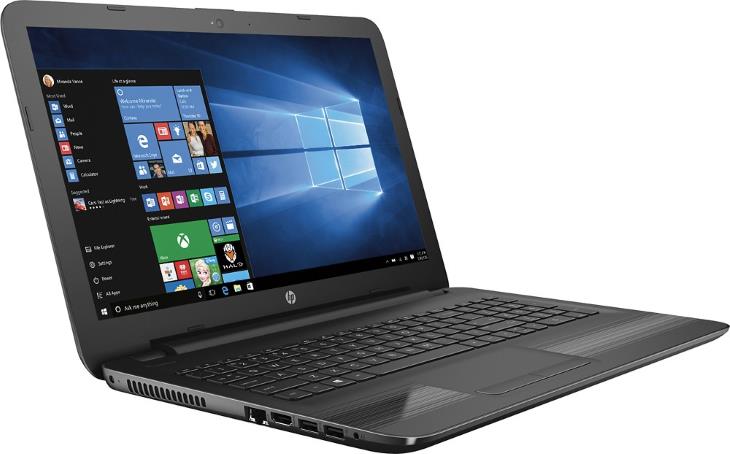
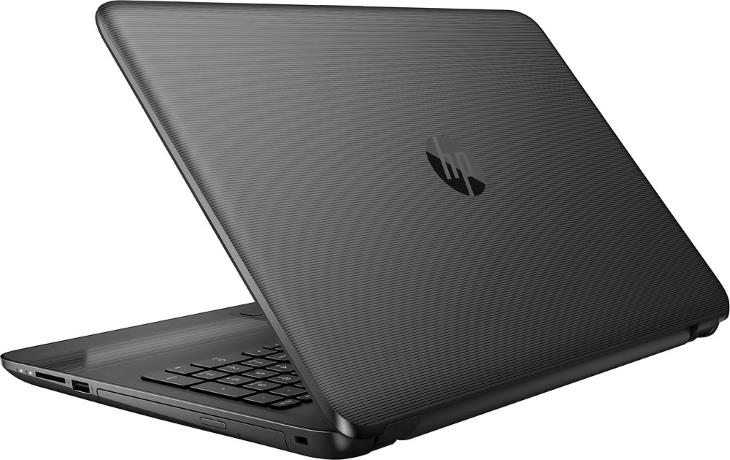
The HP 15-AY173DX is a pretty much typical full-size mainstream laptop for 2017. But, it provides a huge hard drive to stand out from the crowd. The HP 15-AY173DX features an Intel Core i5 processor (CPU), 8GB of system memory (RAM), and a 2-Terabyte hard drive (HDD). These core components are packed in a black plastic chassis with textured linear gradient grooves on the palm rest. It’s a budget casing, but these grooves give it a hint of modern and sporty-elegant look.
As for the display, the 15.6″ LCD panel is a typical entry-level one. It has a resolution of 1366-by-768 pixels as opposed to sharper Full HD 1920×1080. IPS technology for wide viewing angles and touchscreen support are missing, too. For typing and interaction with Windows 10 OS and software, there’s a full-size non-baclit keyboard with numeric pad and a touchpad with integrated “mouse click” buttons.
As for internals, the heart of the system is the 7th Generation Intel Core i5-7200U dual-core processor. It’s an ideal processor for the day-to-day tasks of the home and home & office users. It can effortlessly handle usual duties like web browsing and email, video streaming, text and spreadsheet processing, casual gaming, and similar. If you want to see what running popular apps looks like on this CPU, you can check out our review of the i5-7200U and its Intel HD 620 integrated graphics. The notebook’s main memory size is 8GB. That RAM size is large enough for all normal PC tasks. The included 2TB hard drive as a stand-out feature of the HP 15-AY173DX offers an abundance of free data storage space. It’s twice as large as common notebook HDD size of 1TB, which is a high capacity, too. Therefore, the HP 15-AY173DX can be an attractive buying choice for those who want to store large files like high-definition videos. On the negative side, the provided HDD spinning at 5,400 rpm is the slowest kind of storage devices on the market.
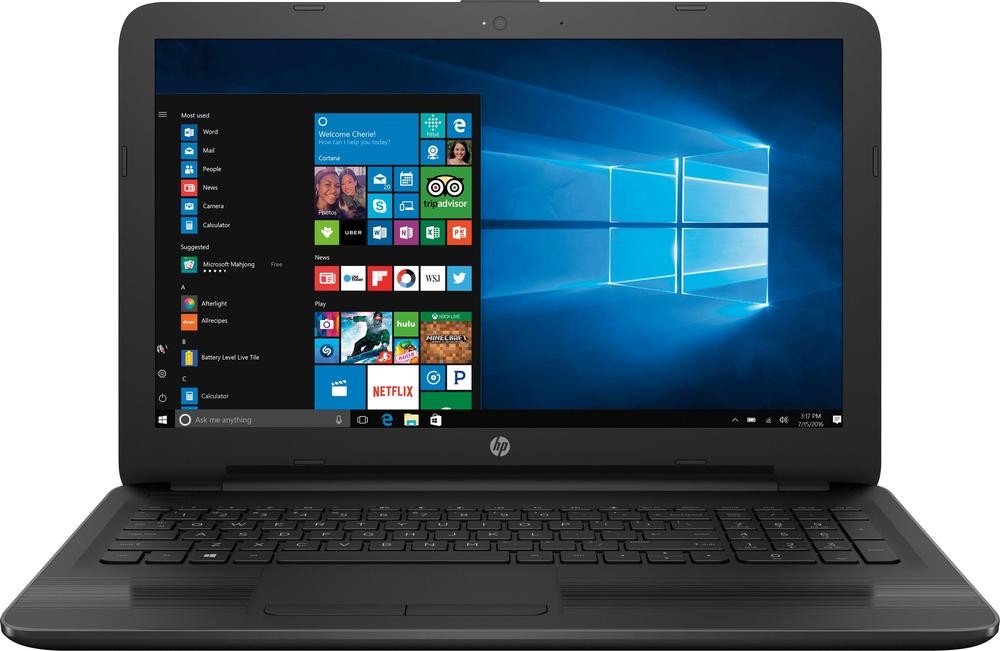
Furthermore, the HP’s 15-AY173DX has a built-in DVD drive, stereo speakers, a web camera, wireless and wired Internet & LAN connectivity, a fast USB 3.1 port and a pair of older-standard USB 2.0 ports, HDMI video output, a combo audio mic / headphones connector, and a multi-format media card reader. Overall, it’s an admirably equipped laptop in the networking and peripheral connectivity department.
The battery inside the 15-AY173DX has a relatively low capacity of 31 WHr. Still, HP claims the battery can provide “up to 7 hours” of operation off the grid. But, that’s most likely with heavily reduced display brightness and low CPU usage.
This notebook model weighs in at 4.7 pounds and is 0.9″ thick. It’s decently portable for a 15.6-inch notebook.
Specifications
| Brand | HP |
|---|---|
| Laptop Type | Standard non-convertible laptop |
| Screen Size | 15.6-inch |
| Screen Resolution | 1366x768 pixels HD |
| Touchscreen | No touchscreen |
| Other Display Specs | TN type |
| Processor (CPU) | Intel Core i5-7200U 7th Gen (enables smooth everyday computing) |
| Graphics (GPU) | Intel HD 620 integrated graphics of 7th Gen Core i3, i5, i7 (for light gaming) |
| System Memory (RAM) Size | 8GB RAM |
| Data Storage | 2000GB (2TB) HDD |
| DVD Optical Drive | DVD writer |
| Keyboard & Input | Non-backlit keyboard with dedicated number pad Touchpad with separate physical click buttons |
| Speakers & Audio | Stereo speakers Combo microphone and headphones audio jack |
| Camera | Front-facing web camera |
| Wi-Fi Wireless | 802.11N |
| Ethernet Network Port | Yes |
| Mobile broadband (4G LTE) | No |
| Bluetooth | No |
| USB Ports | 1 x USB 3.1 2 x USB 2.0 |
| Video Output Ports | 1 x HDMI |
| Media Card Reader | SD card reader |
| Battery | "up to 7 hours" of battery life 31 WHr capacity |
| Weight | 4.7 pounds |
| Height | 0.9" |
| Width | 15.2" |
| Depth | 10.2" |
| Windows Version | Windows 10 Home |
| Warranty | 1-year |
User Reviews, Questions and Answers
Below you can read and submit user reviews, questions, and answers about the HP 15-AY173DX. Thank you for your contribution.
Please CLICK HERE to provide e-mail for receiving notifications when there are new replies
(The e-mail won't be used for any other purposes.)
Related laptops
-

Acer Aspire E 15 E5-575G-57D4 15.6″ Laptop (Full HD, Intel i5-7200U, Nvidia 940MX, 8GB RAM, 256GB SSD)
560 USD* Read More -
Asus P-Series P2540UA-AB51 Business 15.6″ Laptop (FHD Display, 7th Gen Intel Core i5, 8GB RAM, 1TB HDD)
600 USD* Read More -
Dell Inspiron i5566-3000BLK-PUS 15.6″ Touch-Screen Laptop (Intel Core i3, 6GB RAM, 1TB HDD, Black)
370 USD* Read More -
HP 15-AY103DX / 15-BS015DX 15.6″ Touch-Screen Laptop (Intel Core i5, 8GB RAM, 1TB HDD)
479 USD* Read More
More Related Laptops
-

Asus Vivobook Go L510MA-WS05 Affordable Laptop (15.6″ FHD, Intel Celeron N4020, 4GB RAM, 128GB eMMC, 1-yr Microsoft 365)
200 USD* Read More -

HP 15-fd0079wm / A2BZ8UA#ABA Affordable Laptop (15.6″, Intel Celeron N200, 4GB RAM, 128GB UFS, 12-mo. Microsoft 365)
259 USD* Read More -

Acer Aspire 3 A314-36P-3772 14″ Laptop (FHD, Intel Core i3-N305, 8GB RAM, 128GB SSD)
349 USD* Read More -

Asus Zenbook 14 OLED Q415MA-U5512 Laptop (14″ Touch, Intel Ultra 5, 8GB RAM, 512GB SSD)
800 USD* Read More -

HP Stream 14-cf2733wm / A2BZ1UA#ABA Affordable Laptop (14″, Intel Celeron N4120, 4GB RAM, 64GB eMMC, 12-mo Office 365)
129 USD* Read More -

HP Pavilion Plus 16-ab0010nr / 8B898UA#ABA Laptop (16″, Intel i7, 16GB RAM, 512GB SSD)
1,100 USD* Read More -

ASUS TUF A17 FA706NF-RS51 Gaming Laptop (17.3″ FHD 144Hz, AMD Ryzen 5 7535HS, Nvidia RTX 2050, 8GB RAM, 512GB SSD)
785 USD* Read More -

HP 15-fc0037wm / 7W6H6UA#ABA Laptop (15.6″, AMD Ryzen 5 7520U, 8GB RAM, 256GB SSD)
559 USD* Read More -

Lenovo IdeaPad 1 82QD00APUS Laptop (15.6″, Intel i5-1235U, 8GB RAM, 256GB SSD)
444 USD* Read More
ngambifranck –
currently using this laptop, so far so good, did major upgrade though removed the dvd and put a caddy and in the sata port i have an ssd, can say its super slick, just love it. as for games the only one game i move playing is football games, it handle fifa 18 and pro 19(at low settings ) pretty well. i will like to upgrade the ram to 16gb but i dont understant this dual and single channel stuff, can some one explain it to me please
Notify me of replies Unwatch this thread
Dan Z –
Hi, to get dual-channel RAM in this case means using two RAM sticks instead of one, for instance 2 x 8GB versus 1 x 16GB. So if you plan to upgrade to 16GB, it’s recommended to get 2 x 8GB. As the main advantage, dual-channel RAM can noticeably improve gaming performance. It all depends on a game, but for sure the difference is noticeable. Especially when graphics processing relies on integrated graphics, like on this laptop.
Dayanand Sharma –
how to disable and enable touchpad in this laptop, have any specific button in this system
Notify me of replies Unwatch this thread
Danijel Z –
There’s no button for that. If you use Windows 10, you can go to Settings / Devices / Touchpad and disable / enable it there. Or you can go to Control Panel / Hardware and Sound / Mouse and there will be a touchpad tab (on my HP ProBook its called Click Pad). Under that tab you can also enable or disable it. You can also go to Device Manager > Human Interface Devices > HID-compliant touch pad and enable / disable it there (right click on it).
Note: I have edited this answer to include multiple ways to enable / disable touchpad.
5 out of 5
Carlos –
Puede agregársele un disco sólido (ssd)? En resumen; tiene bahía de discos duros disponibles?
Notify me of replies Unwatch this thread
Brian Claudio –
Is the RAM upgradeable?
Notify me of replies Unwatch this thread
Danijel Z –
The official specs sheet isn’t clear regarding RAM. But I’ve found in this maintenance guide http://h10032.www1.hp.com/ctg/Manual/c05087748 (page 31) a picture of internal components of the HP 15-ay series. The picture shows two RAM slots, so it should be possible to add another RAM module. However, RAM in this model is an Authorized Service Provider part. This means it isn’t meant to be replaced by users, so there’s a chance that RAM upgrade might void your warranty.
4 out of 5
Speedy Mercer –
I bought an HP 15-AY173DX and am quite happy with it overall. There is ONE complaint I have so far and that is that the speakers SUCK! It sucks the worst when you actually use it in your lap as the speakers point DOWN and are placed on the BOTTOM front edge of the notebook! WTH HP??? Plan on using headphones or external speakers on this one.
I have one other SLIGHT gripe that is so minor as to be hardly worth mentioning but the power cord plugs in the Left side and I like it on the Right side better because of the way I use my notebooks.
Like I said, other than the speakers, it works great! If sound isn’t a major concern, it’s a great unit.
Notify me of replies Unwatch this thread
Bryte –
How is this device in terms of gaming? To me personally I think the specs are quite ok for games. I haven’t used it yet. I wish someone would say something about it.
Notify me of replies Unwatch this thread
Danijel Z –
It depends on a game. But generally this laptop with the Intel HD 620 graphics is good only for basic gaming. Here’s a review of the HD 620: http://laptoping.com/gpus/product/intel-hd-620-review-graphics-of-7th-gen-core-u-series-kaby-lake-cpus/
Keep in mind that the HP 15-AY173DX has single-channel memory (1x8GB) and that slows down game rendering (generally around 25%). The review above is for dual-channel memory. So overall, the laptop is good for non-demanding games like Minecraft, LoL, Counter Strike on low settings, and similar light game titles.